Features of !SEMTools
↑ Навигация по задачам в Excel и возможностям надстройки !SEMTools ↑

Excel basics

Core Excel skills: references and array formulas, special characters, keyboard shortcuts, working with sheets, rows and columns, sorting data.

Deleting data

Delete cells by condition in Excel

Tools to delete cell contents or the cells themselves in Excel by any condition: by content, characters, duplicates and more.

This section is devoted to situations when you need to delete the contents of cells in Excel by a certain condition.

2 min
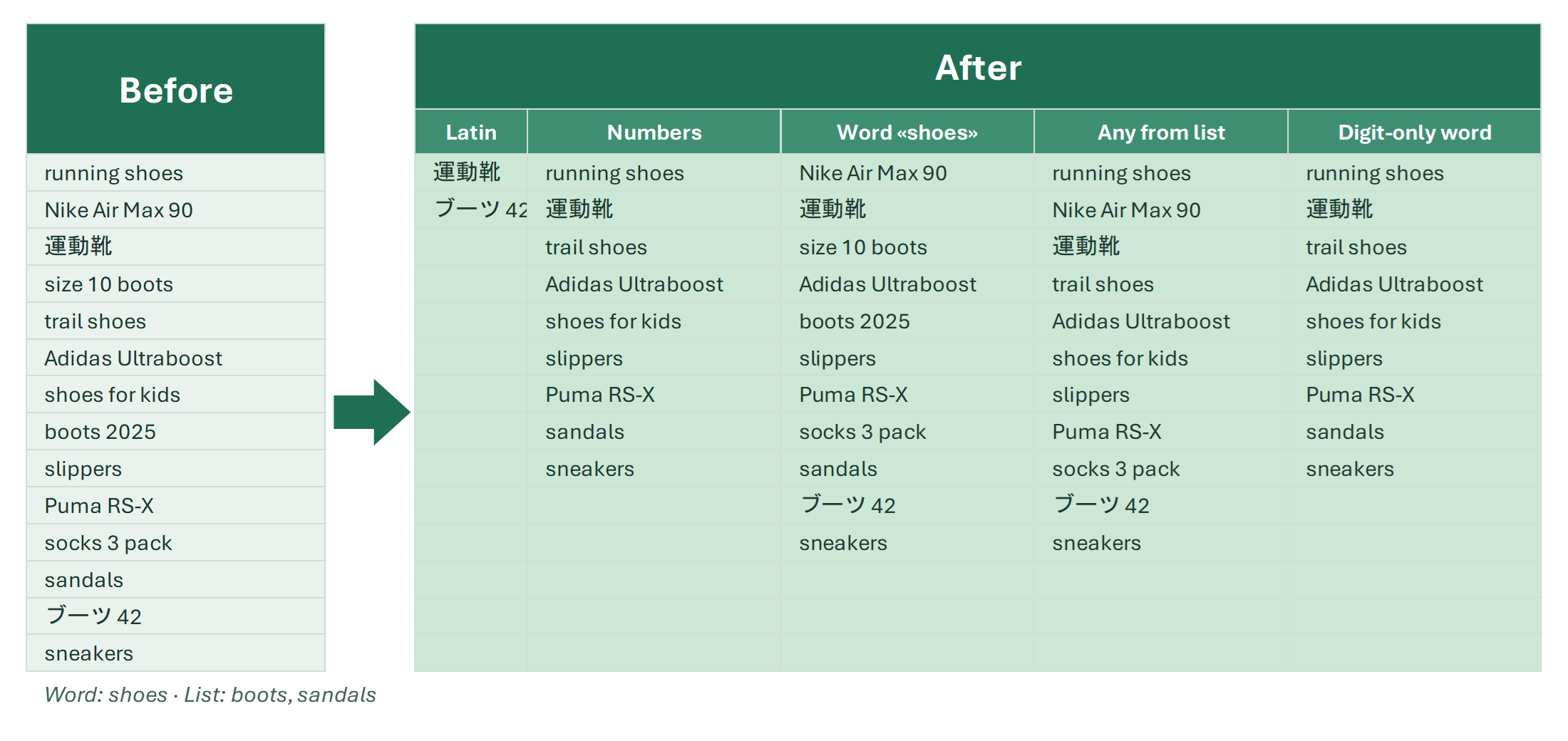
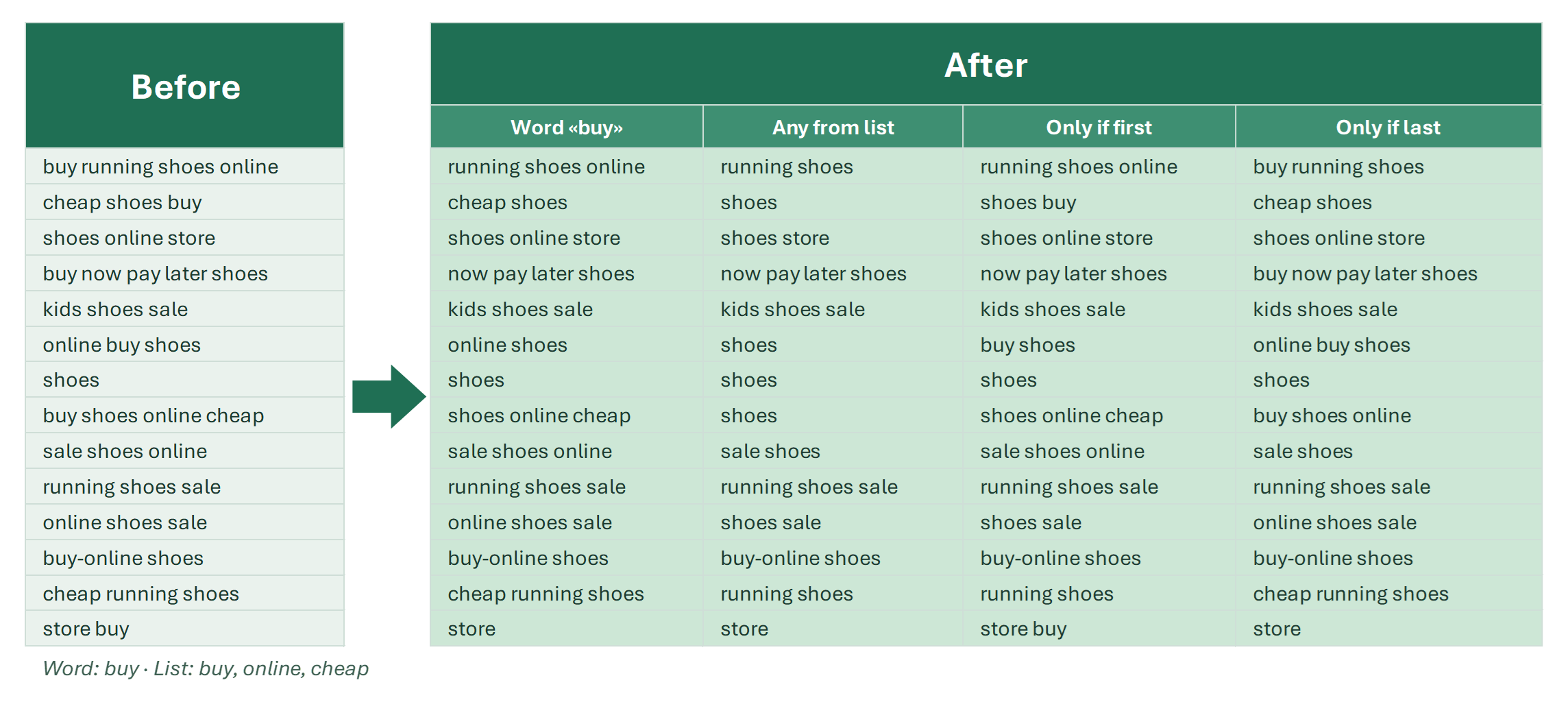
Delete cells by content in Excel

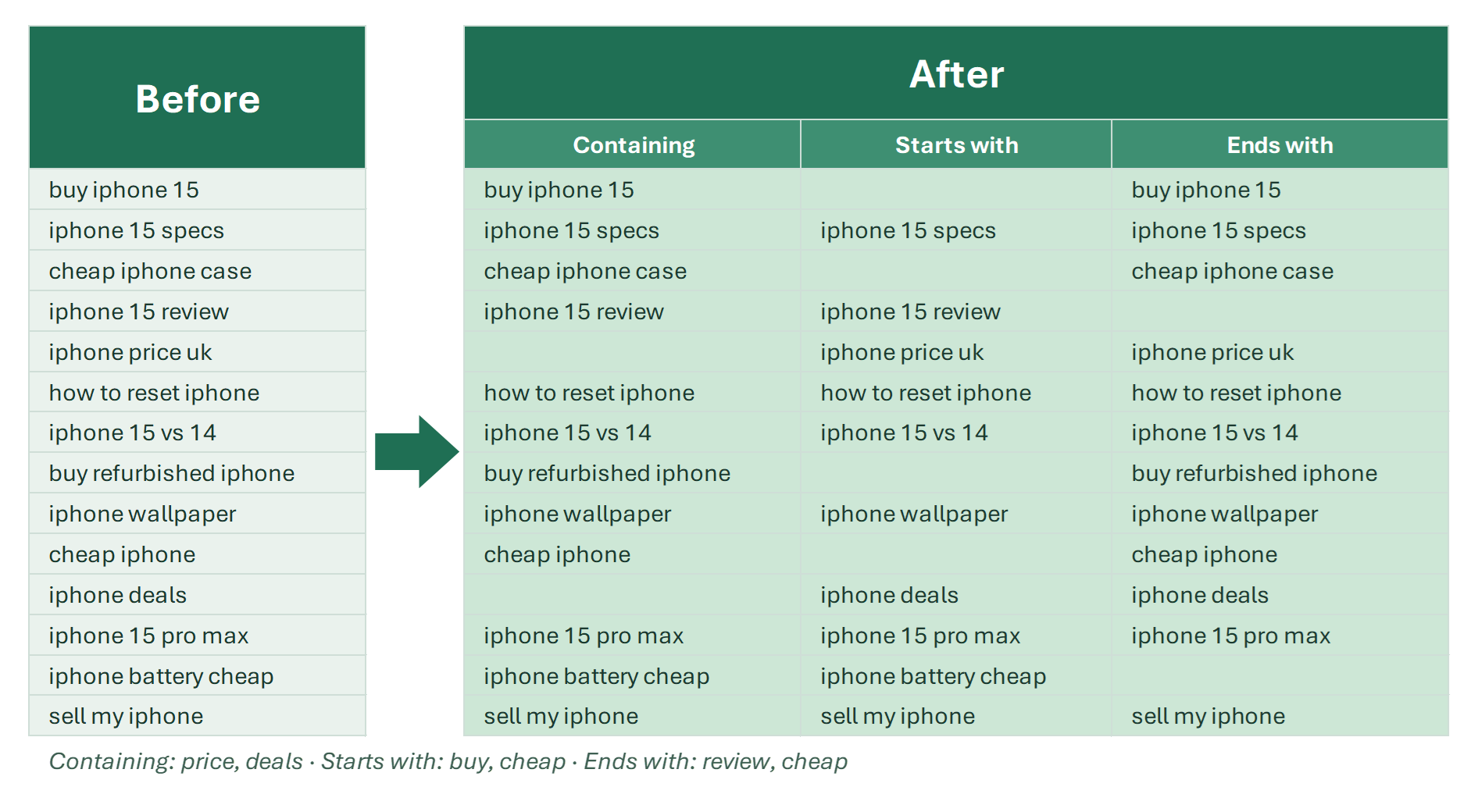
How to delete cells containing specific text in Excel: Find All, the filter, Go To Special, FILTER, and !SEMTools: by a list of values, whole words or regex.

The “Delete cells by content” procedures in the !SEMTools add-in clear or delete the cells that match given criteria in a few seconds. It’s handy for cleaning…

6 min

Delete rows in Excel based on one or multiple conditions

How to delete Excel table rows based on one or multiple conditions: filter and formulas, or tools that remove rows by words, digits or length in 2 clicks.

The tools in this article are available in the free version of !SEMTools, Lite and Pro.

14 min

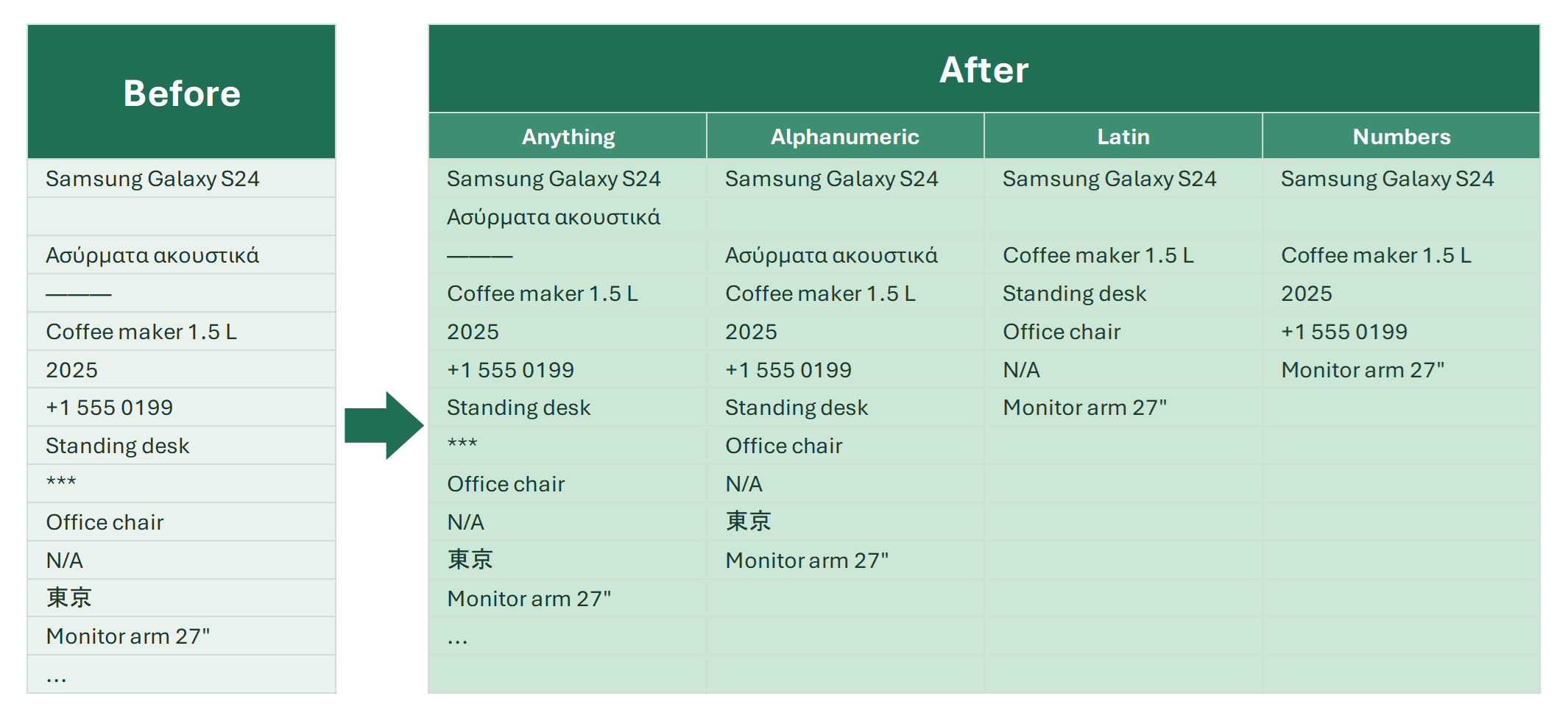
Deletion tools

Tools to delete specific rows, cells, characters, words, ranges and formulas in Excel by one or several conditions, plus formula alternatives.

How do you delete unnecessary data in Excel tables in bulk? To answer this, first figure out what the data you want to delete consists of and what it has in…

How to delete empty columns in Excel

How to delete blank columns in Excel: find them with COUNTA, FILTER with BYCOL in Excel 365, VBA for a sheet or a workbook, and a free 2-click tool.

Need to delete empty columns in Excel on one sheet or on several? Unlike rows, Excel has no filter for columns, so the usual tricks don’t work. Here are a few…

5 min

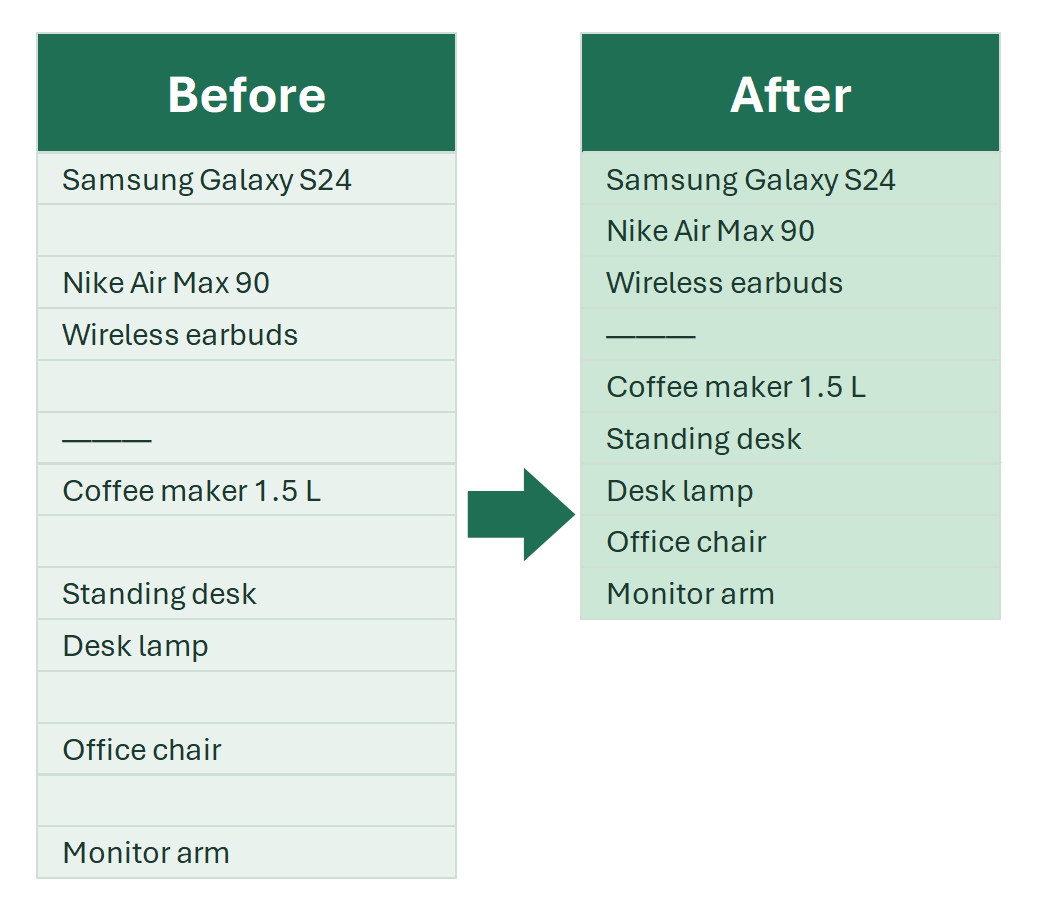
How to delete empty rows in Excel

How to delete blank rows in Excel safely: helper column with COUNTA, FILTER in Excel 365, rows at the end of a sheet, and a free 2-click tool for all sheets.

The !SEMTools procedure described at the end is fully functional in the free version.

7 min

How to remove formulas from Excel cells

Convert formulas to values in a range, sheet or several sheets. What to do with filtered cells and how to extract formula text. Shortcuts and tools.

There are many ways to remove formulas in Excel, depending on what you're trying to achieve. Most of the time, you want to keep some kind of value in the cells.…

5 min

Remove unnecessary columns and rows by condition

Free tools to delete rows and columns in Excel by many conditions: empty rows, empty columns and ranges that match a pattern.

When working with data in Excel, you often have to clear data from unnecessary rows and columns. This is easy to do when the rows that fall under the pattern to…

3 min

Changing and replacing

Fill blank cells with zeros or values above/below in Excel

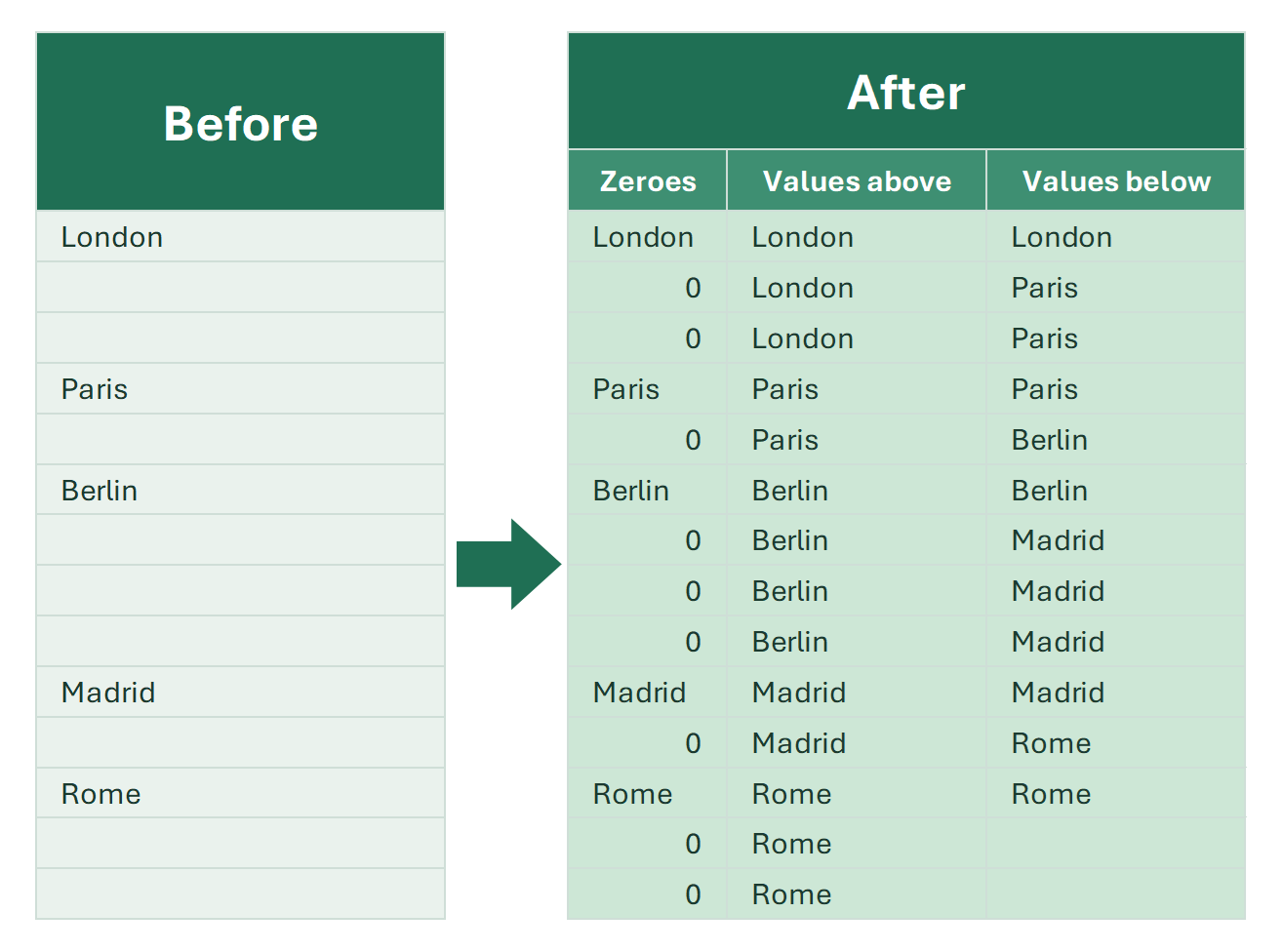
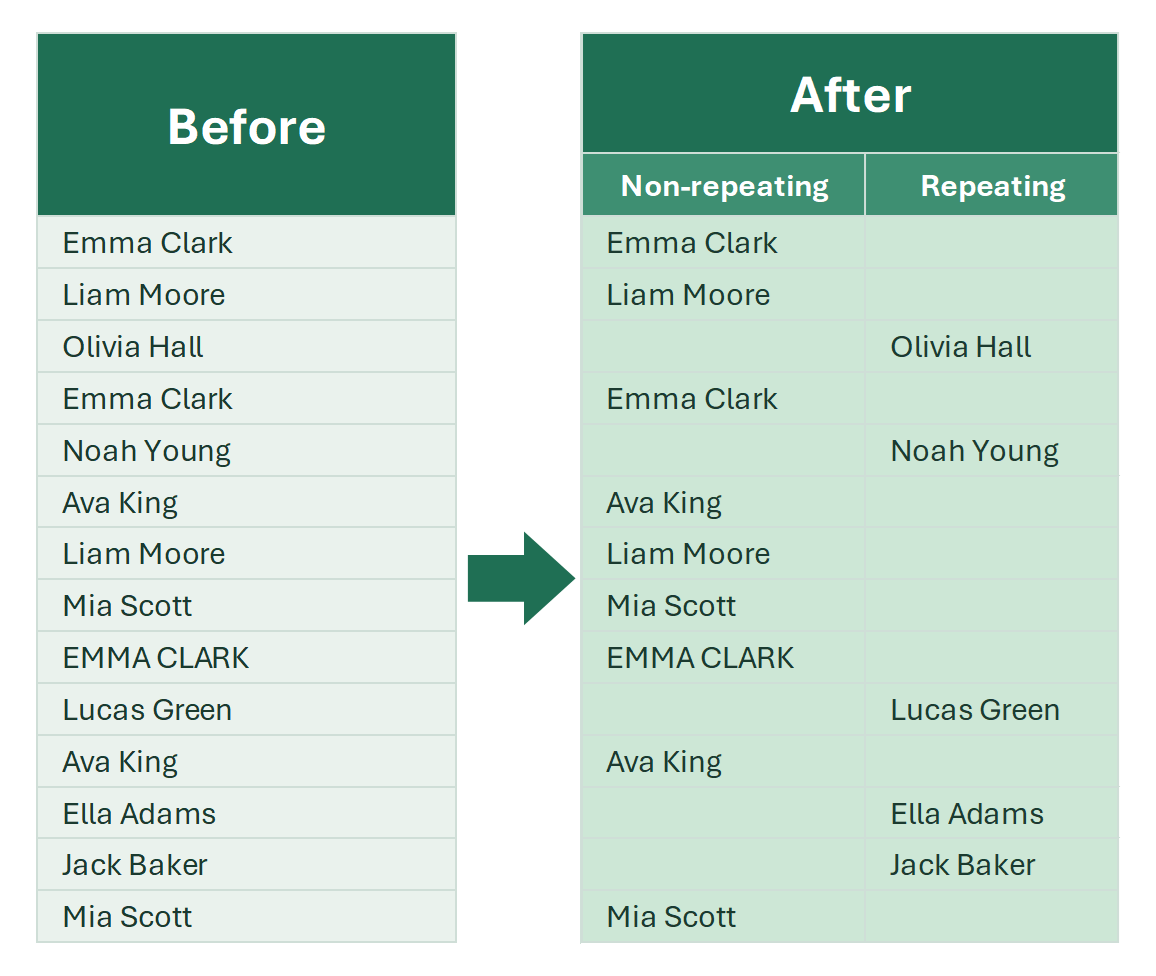
Fill empty cells with the value above or below, or with zeros. Step-by-step algorithm, the formulas you need and a two-click tool.

In large Excel tables, it’s common to leave repeated values blank for a cleaner visual layout — for example, omitting duplicate names in consecutive rows or…

3 min

Sorting data in Excel

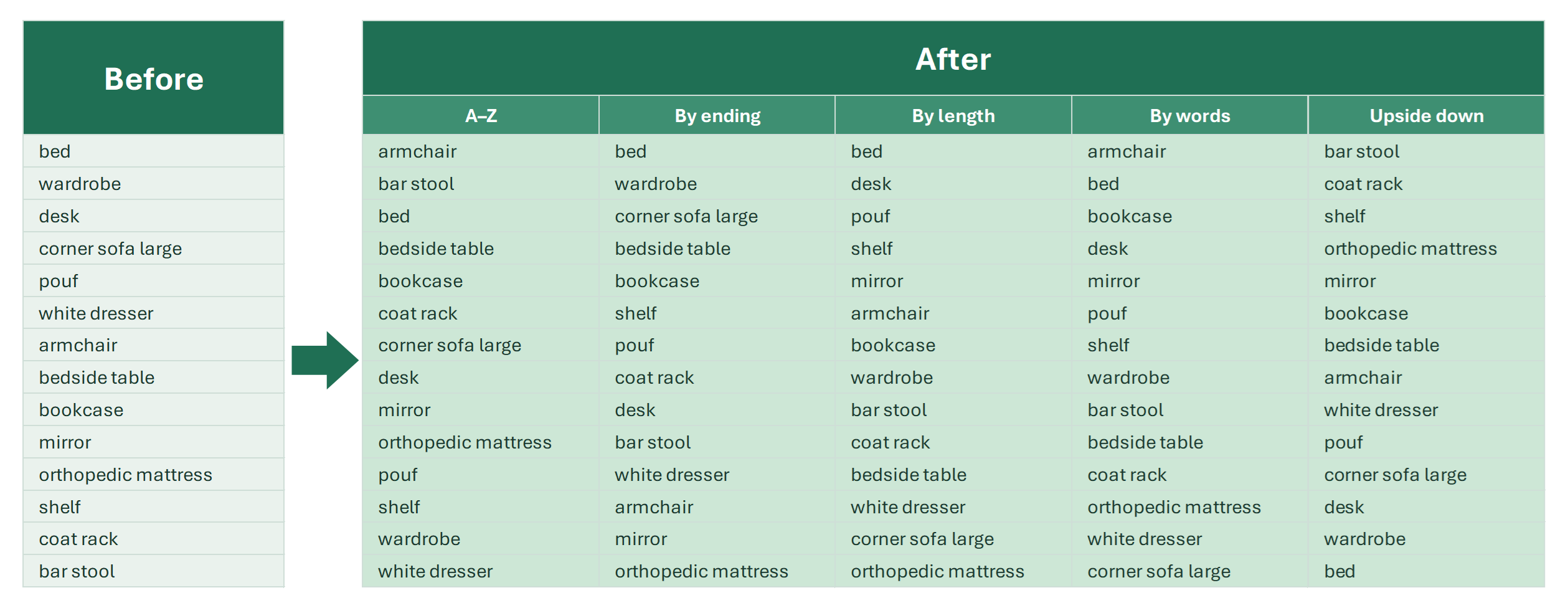
How to sort data in Excel: the filter, the context menu, multi-level and color sorting in the Sort dialog, SORT and SORTBY in Excel 365, sorting by length.

Sorting is one of the most necessary operations with data. It makes analysis much easier, letting you:

6 min

Split a cell into rows in Excel

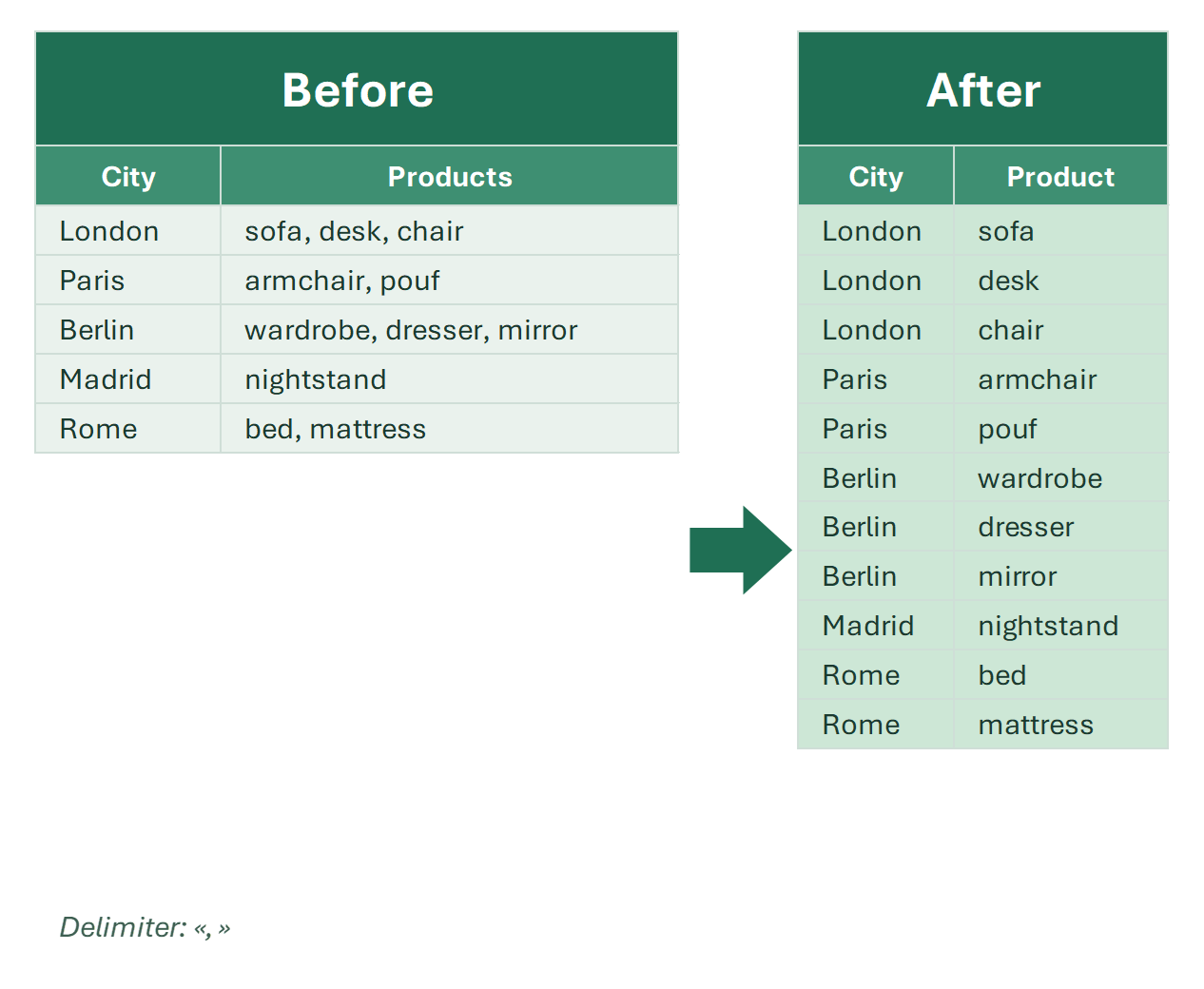
How to split a cell into multiple rows in Excel: TEXTSPLIT, a whole table with categories in one formula, Power Query and “Unpivot and split 2nd column” in !SEMTools.

Splitting a cell into rows in Excel means taking a cell with a list — “carrot, onion, potato” — and putting each value on its own row. For one cell, the formula…

Transformation of ranges

Tools and formulas that change the order of elements in Excel ranges — sort, reverse, shuffle — without changing the values themselves.

A range transformation is defined as a change in the order of its elements without changing the elements themselves.

1 min

Splitting and combining

Combine all columns into one in Excel

How to stack all columns of a table into one long column in Excel: TOCOL in Excel 365, an INDEX formula, a VBA macro and a free two-click tool.

When analyzing data in Excel, you often need to collect the values from all columns of a table into one long list: for statistics, a summary report, removing…

5 min

Combine all sheets into one in Excel

How to combine data from all sheets of a workbook into one sheet: VSTACK with a 3D reference, a VBA macro with sheet names, and a free one-click tool.

The procedure described below is available in the free version of !SEMTools (Lite and Pro).

5 min

Combining data in Excel

How to combine data in Excel: the & operator, CONCATENATE, CONCAT, TEXTJOIN, Merge Cells pitfalls, and combining sheets, workbooks and CSV files.

Combining data is one of the basic and at the same time most multifaceted tasks in Excel. The term covers completely different operations: from joining text in…

9 min

How to merge CSV files into one

How to combine multiple CSV files into one: Power Query from a folder, a VBA macro that keeps one header, the command line and a free 2-click Excel tool.

Excel opens small CSV files easily, but often there are many files of the same kind, such as daily exports, reports by region or keyword lists, and you need to…

Joining and splitting data tools for Excel

Tools to join data with or without separators and generate combinations and permutations of words and phrases in Excel.

Perhaps the least popular section of the add-in, but nevertheless quite interesting. It is responsible for generating data from other data by joining and…

Merge open workbooks into one in Excel

How to combine several open Excel workbooks into one: Move or Copy, a VBA macro, Power Query and a tool that merges all open workbooks in a few clicks.

Combining data from several Excel workbooks into one is a typical task when consolidating reports, collecting data from colleagues or analyzing exports from…

5 min

Split an Excel sheet into multiple sheets by column value

How to split an Excel table into multiple sheets by column value: !SEMTools in 2 clicks, PivotTable Show Report Filter Pages, FILTER and a VBA macro. Plus sheets to separate files, pages and panes.

Splitting an Excel sheet into several sheets by column value means moving table rows so that each city, manager or month gets its own sheet. Excel has no…

10 min

Function reference

AND

The AND function returns TRUE only when all conditions are met. Syntax, AND with IF and OR, and common mistakes in Excel formulas.

The AND function checks whether all provided conditions are TRUE. Returns TRUE only if every condition is met, FALSE if any condition is not met.

IF

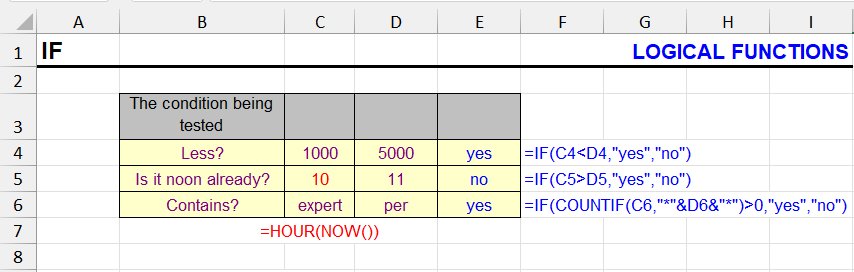
How the IF function works: syntax, nested IF, IF with AND/OR, text and number conditions, IF in array formulas, and the most common mistakes.

The function checks the truthfulness of the first argument - a calculation or cell value. Depending on the result, calculations will be performed or other…

IFERROR

The IFERROR function replaces #N/A, #DIV/0! and other errors with a value. Beginner-friendly examples, IFERROR with VLOOKUP, IFNA vs IFERROR.

Often when using formulas, if the result returns an error, you need to handle it, and if not, return the calculation result.

ISERR

The ISERR function returns TRUE for any error value except #N/A. Syntax, examples and the difference between ISERR, ISERROR and ISNA.

This function checks a cell and returns TRUE if the cell contains an error value.

ISNA

The ISNA function returns TRUE when a cell contains the #N/A error. Syntax, use with VLOOKUP and MATCH to check if a value exists in a list.

ISNA reacts only to #N/A, ISERR to every error except #N/A, ISERROR to all of them.

NOT

NOT turns TRUE into FALSE and vice versa. Syntax and examples of NOT with IF, ISBLANK and other functions to invert conditions.

This function performs negation of the input logical value.

OR

The OR function returns TRUE if at least one condition is met. Syntax, OR in nested formulas with IF and AND, array formulas and similar functions.

The OR function checks whether any of the provided conditions are TRUE. Returns TRUE if at least one condition is met, FALSE if all conditions are FALSE.

SHEET, SHEETS

The SHEET function returns a sheet number and the SHEETS function counts sheets in a reference. Syntax and examples for dynamic references.

The SHEET and SHEETS functions are used for working with sheets in an Excel workbook. They belong to the information functions category and can be useful when…

Excel basics

Absolute and relative references in Excel

Absolute, relative and mixed references in Excel: what the $ sign means, how to lock a cell in a formula with F4, examples with exchange rates, running totals and VLOOKUP.

An absolute reference in Excel is a cell reference with dollar signs: $A$1. The $ sign locks the column and the row, so the reference doesn’t change when you…

13 min

Array formulas in Excel

What array formulas are, how they work in old Excel (Ctrl+Shift+Enter) and in Excel 365 with dynamic arrays. Examples, array constants and common errors.

Array formulas are one of the most powerful and most misunderstood features of Excel. For years they looked like magic: curly braces, a strange key combination…

Excel for beginners: questions and answers

Answers to the main questions of new Excel users: working with the program, basic-level questions and a detailed look at essential functions.

Starting with Excel can feel overwhelming. Where do you even begin with such a powerful program?

3 min

Excel hotkeys (keyboard shortcuts)

A reference of Excel hotkeys with a detailed breakdown by category: data entry, tools, interface, navigation, selection, formatting and formulas.

Excel keyboard shortcuts are your secret weapon for speed. They let you execute dozens of routine operations in just two keystrokes, completely bypassing menus…

7 min

How many sheets are in an Excel workbook

How many sheets are in an Excel workbook: the SHEETS and SHEET functions, the VBA Immediate window, a COUNTA trick and !SEMTools.

Knowing the number of sheets in an Excel workbook is useful when checking the structure of a document, automating data processing or preparing reports. Here are…

5 min

How to create a hyperlink in Excel: 10 ways

10 ways to make a hyperlink in Excel: Ctrl+K, the HYPERLINK function, links to another sheet, email, Telegram and WhatsApp links, named ranges and files.

In complex workbooks, you often need to insert a link to a cell on another sheet, make links to all sheets of a workbook, or turn a column of URLs into…

How to create the alphabet in Excel

How to list the alphabet A to Z in Excel: CHAR with ROW or SEQUENCE, the next letter with CHAR and CODE, column letters, other alphabets and AutoFill.

A common task is to quickly list all the letters of the alphabet in rows or columns: A, B, C… for headers, labels, test data or seat numbers.

How to split cells in Excel

How to split a cell in Excel: Text to Columns, first and last names into separate cells, formulas, diagonal split, merged cells and splitting into rows — step by step with interactive examples.

How you split a cell in Excel depends on what you mean by “cell”. To split its contents into several cells — a full name into three columns, or “city, street…

How to switch between sheets in Excel

How to switch between sheets in Excel fast: Ctrl+PgUp/PgDn, the Activate dialog, Go To, a VBA table of contents and a searchable sheet list.

When a workbook has dozens of sheets with long names, the usual way of switching between tabs with the mouse becomes inconvenient: the tabs don’t fit, and you…

4 min

Personal Macro Workbook (PERSONAL.XLSB) in Excel

How to create the Personal Macro Workbook in Excel, where PERSONAL.XLSB is, how to unhide it, use your functions, copy, move and delete macros.

I started my way in programming with simple macros recorded with Excel’s built-in macro recorder. It was convenient: press a button, and Excel records your…

10 min

Special characters in Excel

All Excel special characters: the $ sign and absolute references, quotes and the exclamation mark in formulas, square brackets, =, commas and colons, wildcards * ? ~, # @ { } — with examples.

Everyone means something different by “special characters in Excel”. Different groups of characters have different special properties, and that’s why users call…

Other articles

How to create a table of contents in Excel

How to create a table of contents in Excel: a VBA macro that lists all sheets with hyperlinks, a HYPERLINK formula, and free !SEMTools tools in one click.

Sometimes the number of sheets in an Excel workbook grows so large that switching between sheets becomes inconvenient. To speed up the work, create a table of…

4 min