
ABS
How the Excel ABS function returns the absolute value of a number. Syntax, formula examples and typical uses: differences, deviations, negative numbers.
See also, and don't confuse with: ABC analysis in Excel
4 min
Excel function reference: syntax, arguments and formula examples. Text, math, logical, date and time functions and the new Excel 365 functions.
How the Excel ABS function returns the absolute value of a number. Syntax, formula examples and typical uses: differences, deviations, negative numbers.
See also, and don't confuse with: ABC analysis in Excel

The AND function returns TRUE only when all conditions are met. Syntax, AND with IF and OR, and common mistakes in Excel formulas.
The AND function checks whether all provided conditions are TRUE. Returns TRUE only if every condition is met, FALSE if any condition is not met.

The BIN2DEC function converts binary numbers to decimal in Excel. Syntax, the 10-bit limit, negative numbers in two's complement and worked examples.
This function converts a binary number to decimal number system.
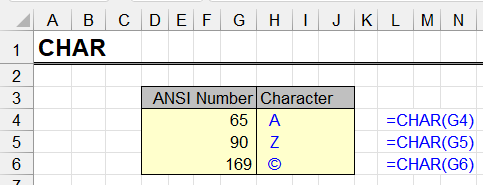
The CHAR function returns a character by its ANSI code. Syntax, code table, line breaks with CHAR(10), and a trick to build an A–Z alphabet in Excel.
This function converts an integer to the character that corresponds to it in the current ANSI encoding used by the operating system.
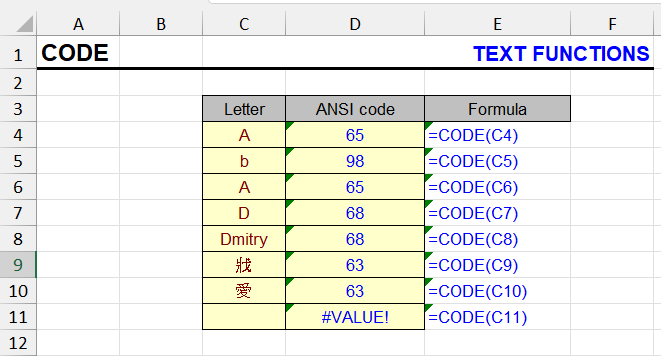
The CODE function returns the ANSI code of the first character in a string. Syntax, examples, and how to detect hidden characters.
This function returns the ANSI value of the first character in the input string. Simply put - it converts a letter to a number (which corresponds to it in the…

Join text from cells with the CONCATENATE function, & , CONCAT or TEXTJOIN. How to combine a date and text without the date turning into a number.
The function performs the concatenation operation.
Convert inches to cm, pounds to kg, Fahrenheit to Celsius and more with the Excel CONVERT function. Syntax, unit codes and formula examples.
This function converts a numerical value from one unit type to its equivalent expressed in another unit type.
The COUNTA function counts non-empty cells in ranges. Syntax, examples, why it counts empty strings, and COUNTA vs COUNT and COUNTBLANK.
The function counts the number of non-empty cells in one or more selected ranges.
The COUNTIF function counts cells that meet a criterion. Syntax, comparison operators, wildcards, dates and cell references, with examples and gotchas.
The COUNTIF function in Excel is used to count the number of cells in a range that meet a specific criterion. COUNTIF is very useful when you need to know how…

The DATE function creates a valid date from year, month and day. Syntax, examples, month and day overflow, and fixing dates imported as text.
The DATE function constructs a date from three numbers: year, month, and day. This is the most reliable way to create a correct date in Excel, especially when…
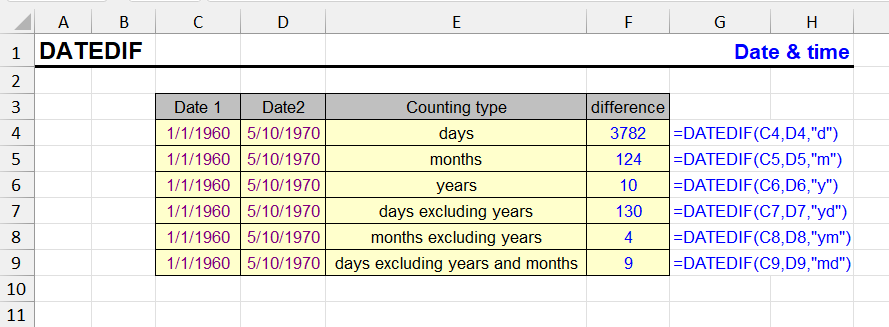
The DATEDIF function returns the difference between two dates in years, months, days or combinations. Age and tenure formulas, all units, known bugs.
The DATEDIF function returns the difference between two dates in specified units: years, months, days, or their combinations. Useful for calculating age, work…
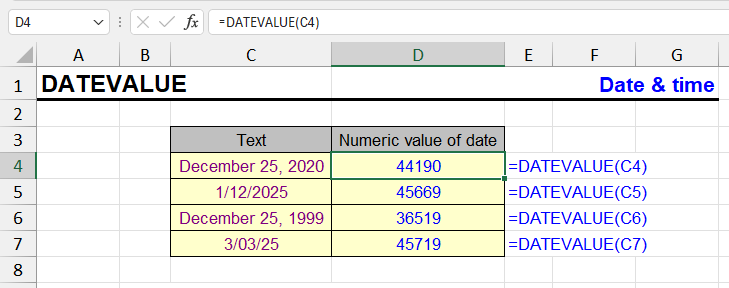
The DATEVALUE function turns dates stored as text into real Excel dates. Syntax, regional format issues and examples for imported data.
This function is used to convert text into a date that can be used in calculations.
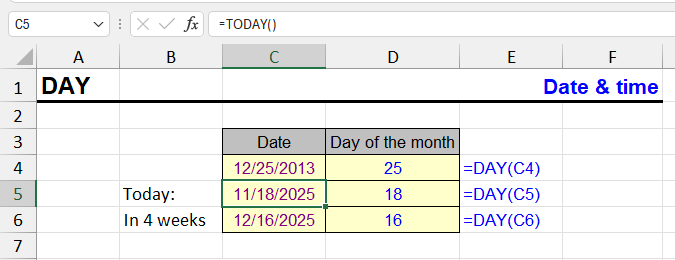
The DAY function returns the day of the month (1–31) from a date. Syntax and examples for grouping, filtering and building dates in Excel.
The DAY function returns the day of the month from a given date. The result is always a number between 1 and 31.
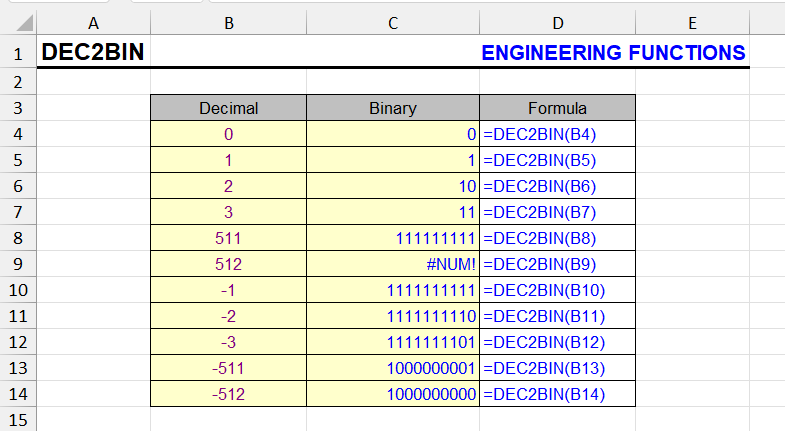
The DEC2BIN function converts decimal numbers to binary. Syntax, the -512 to 511 limit, padding with leading zeros and handling larger numbers.
This function converts a decimal number to its binary equivalent.

The DEC2HEX function converts decimal numbers to hexadecimal. Syntax, the places argument, negative numbers and formula examples.
This function converts a decimal number to its hexadecimal equivalent.

The DELTA function returns 1 if two numbers are equal and 0 if not. Syntax, examples and how to use DELTA to count matching pairs in Excel.
This function compares two values and checks if they are exactly equal.
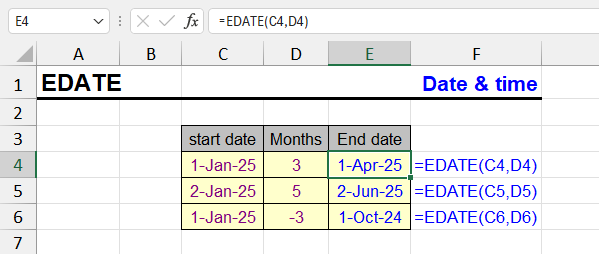
The EDATE function shifts a date by N months forward or back: due dates, contract terms, expiry dates. Syntax, examples and end-of-month behaviour.
The EDATE function in Excel is used to calculate a date that is a specified number of months before or after a given date. This is particularly useful for…

The EOMONTH function returns the end-of-month date shifted by N months. Syntax, month-end report examples and getting the first day of a month.
The EOMONTH function returns the last date of the month, shifted by a specified number of months from the original date.

The EXACT function compares two strings and returns TRUE only on an exact, case-sensitive match. Syntax and examples for true duplicates.
This function compares two text items and determines if they are exactly the same.

The FIND function returns the position of text inside a string, case-sensitive. Syntax, examples, FIND vs SEARCH, and how to handle the #VALUE! error.
This function searches for text within another text fragment using case-sensitive search. This distinguishes it from the SEARCH function, despite having an…

The GESTEP function returns 1 if a number is greater than or equal to a threshold and 0 otherwise. Syntax and examples for counting values above a step.
This function checks whether a number reaches a certain value (in other words, whether it's not less than the threshold).

The HEX2DEC function converts hexadecimal numbers to decimal. Syntax, limits, negative values in two's complement and a worked example.
This function converts a hexadecimal number to decimal.

The HOUR function returns the hour (0–23) from a time or date-time value. Syntax, examples, and how to get hours from text times or durations over 24 hours.
The HOUR function is used to extract the hour number from a time or date value. It returns an integer from 0 to 23, corresponding to the hour in 24-hour format.
The HYPERLINK function creates clickable links to websites, files, sheets, cells and email. Syntax, ordinary and unusual formula examples, quirks.
This is an article about the HYPERLINK function. See also our guide on similar procedures and other tools: "10 ways to create a hyperlink in Excel".
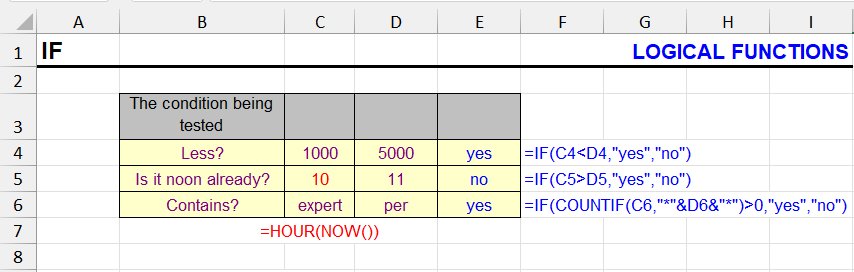
How the IF function works: syntax, nested IF, IF with AND/OR, text and number conditions, IF in array formulas, and the most common mistakes.
The function checks the truthfulness of the first argument - a calculation or cell value. Depending on the result, calculations will be performed or other…

The IFERROR function replaces #N/A, #DIV/0! and other errors with a value. Beginner-friendly examples, IFERROR with VLOOKUP, IFNA vs IFERROR.
Often when using formulas, if the result returns an error, you need to handle it, and if not, return the calculation result.

The ISERR function returns TRUE for any error value except #N/A. Syntax, examples and the difference between ISERR, ISERROR and ISNA.
This function checks a cell and returns TRUE if the cell contains an error value.

The ISNA function returns TRUE when a cell contains the #N/A error. Syntax, use with VLOOKUP and MATCH to check if a value exists in a list.
ISNA reacts only to #N/A, ISERR to every error except #N/A, ISERROR to all of them.
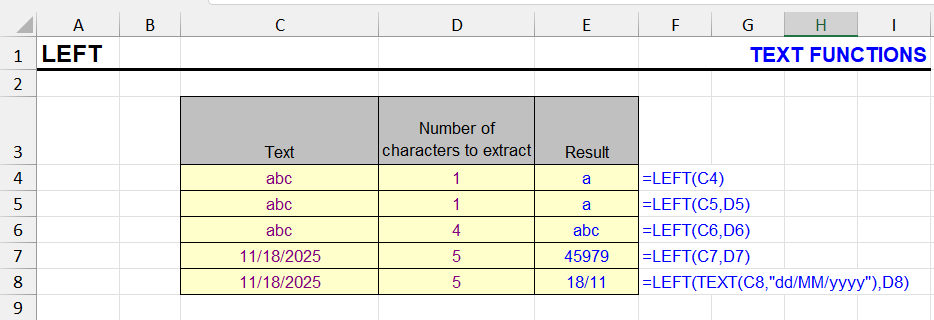
The LEFT function extracts the first N characters of a string. Syntax, combinations with FIND and SEARCH, text before a character, array formulas.
Returns the first N characters of text from the left.
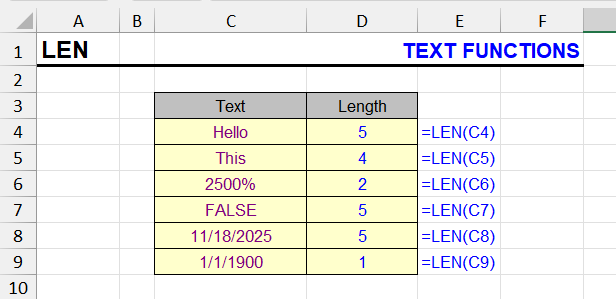
The LEN function counts characters in a cell, including spaces. Count specific characters and words, LEN with TRIM, and LEN in array formulas.
This function allows you to count the number of characters in a cell, including spaces and numbers, in this string expression. Pay attention to the examples…
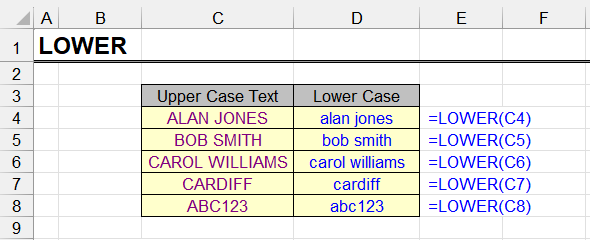
The LOWER function converts text to lowercase. Syntax, examples, combining with UPPER and PROPER, and making only the first letter uppercase.
The LOWER function converts all letters in the value passed to it to lowercase. Everything that has no case, such as digits, punctuation and spaces, stays as it…

The MID function extracts a substring from a given position. Syntax, combinations with FIND and SEARCH, text between characters, array formulas.
MID extracts a text fragment from the middle of a text string.The function needs to know at which position the fragment to extract begins and how many…

The MINUTE function returns the minutes (0–59) from a time value. Syntax, examples and how to convert durations to minutes in Excel.
The MINUTE function is used to extract minutes from a time value in Excel. It returns a number from 0 to 59, corresponding to the minute component of the passed…

The MONTH function returns the month number (1–12) from a date. Syntax, getting the month name with TEXT, and grouping data by month.
The MONTH function returns the month number from a given date. The result will be a number from 1 to 12.
Excel functions reference: 150+ popular functions A–Z and by category: text, logical, date, lookup, math. Each function with syntax and examples.
Excel has so many functions that a reference guide is simply necessary. Those available now have their pros and cons, so I decided to compile my own.

The NETWORKDAYS function counts working days between two dates, excluding weekends and holidays. Syntax, examples and NETWORKDAYS.INTL.
The NETWORKDAYS function calculates the number of working days between two dates. It automatically excludes weekends (Saturday and Sunday), and can also account…
NOT turns TRUE into FALSE and vice versa. Syntax and examples of NOT with IF, ISBLANK and other functions to invert conditions.
This function performs negation of the input logical value.
The NOW function returns the current date and time with up to 10 ms precision. Formatting, NOW vs TODAY, and how to insert a static timestamp.
The NOW function, despite its name, returns more than just the current date. That's what the TODAY function does. Our featured function returns both date and…

The OR function returns TRUE if at least one condition is met. Syntax, OR in nested formulas with IF and AND, array formulas and similar functions.
The OR function checks whether any of the provided conditions are TRUE. Returns TRUE if at least one condition is met, FALSE if all conditions are FALSE.
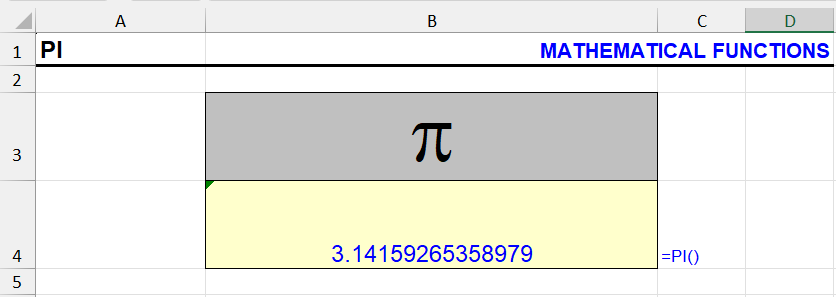
The PI function returns π to 15 digits. Many examples: area and volume of popular shapes as Excel formulas, circumference, degrees to radians.
This function returns the value of Pi with an accuracy of 14 decimal places. The function doesn't require any arguments, it returns the value by itself. Similar…
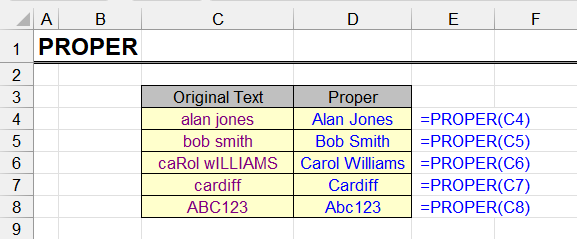
The PROPER function capitalizes the first letter of every word. Syntax, examples, issues with apostrophes and abbreviations, and how to fix them.
This function converts the first letter of each word to uppercase and all subsequent letters to lowercase.
The REGEXEXTRACT function in Excel 365: syntax and return modes, how to extract a number, email, phone and text after a label with regular expressions — with examples.
The REGEXEXTRACT function in Excel pulls out the part of a text that matches a regular expression: =REGEXEXTRACT(A2,"\d+") returns the first number in a cell…
The REGEXREPLACE function in Excel 365: syntax, removing digits and characters, Nth occurrence, $1 $2 groups and masking data with regular expressions — with examples.
The REGEXREPLACE function in Excel replaces the parts of a text that match a regular expression: =REGEXREPLACE(A2,"\d","") removes all digits from a cell…
The REGEXTEST function in Excel 365: syntax, validating phone numbers, emails and ZIP codes with regular expressions, IF, FILTER and counting — with interactive examples.
The REGEXTEST function in Excel checks whether text matches a regular expression and returns TRUE or FALSE: =REGEXTEST(A2,"\d") tells you whether a cell…
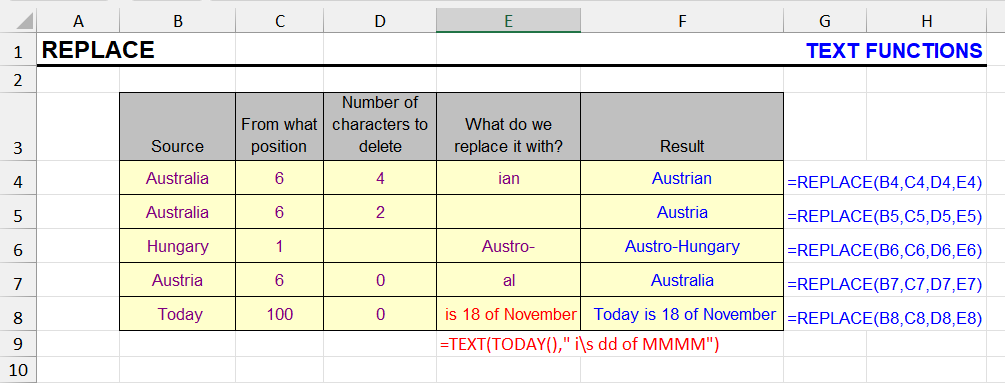
The REPLACE function swaps part of a string at a given position with new text. Syntax, examples, and REPLACE vs SUBSTITUTE.
REPLACE is a text function that allows you to replace part of a string with different text at a specified position. This is especially useful when you need to…

The REPT function repeats a text string a given number of times. Syntax and examples: padding with zeros, in-cell bar charts and separators.
This function repeats a text fragment a specified number of times.

The RIGHT function extracts the last N characters of a string. Syntax, getting text after a character, and RIGHT combined with LEN and FIND.
The RIGHT function returns the rightmost part of the referenced value, with the specified number of characters. In other words, it allows to extract the last N…
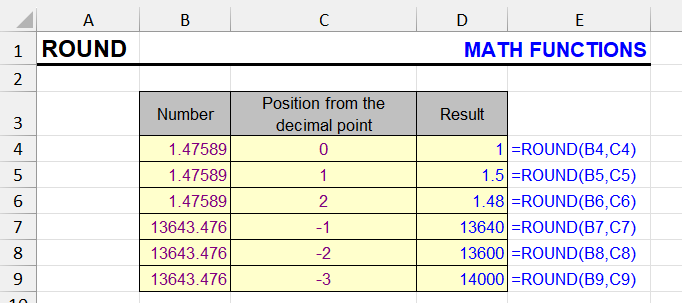
The ROUND function rounds numbers to N decimals, whole numbers, tens or hundreds. Syntax, arguments, negative digits and other rounding functions.
ROUND is an Excel function used in formulas to round numbers according to standard mathematical rules.

The ROUNDDOWN function rounds a number towards zero to the given digits. Syntax, arguments, and how it differs from ROUND, INT and TRUNC.
When rounding in Excel, you often need to round numbers down - to whole numbers or several decimal places.
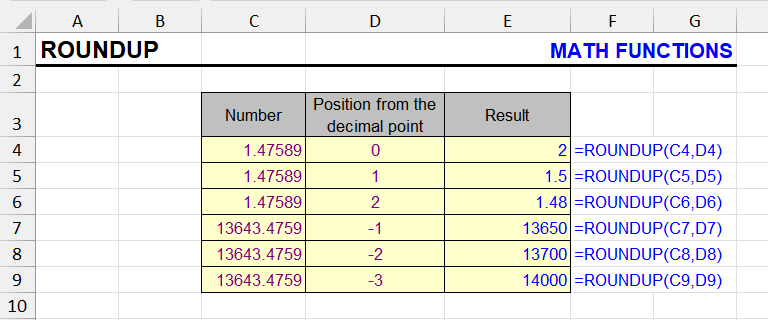
The ROUNDUP function rounds a number away from zero to the given digits. Syntax, examples for prices and quantities, and ROUNDUP vs CEILING.
Rounding in Excel is one of the most important procedures when working with numerical data.
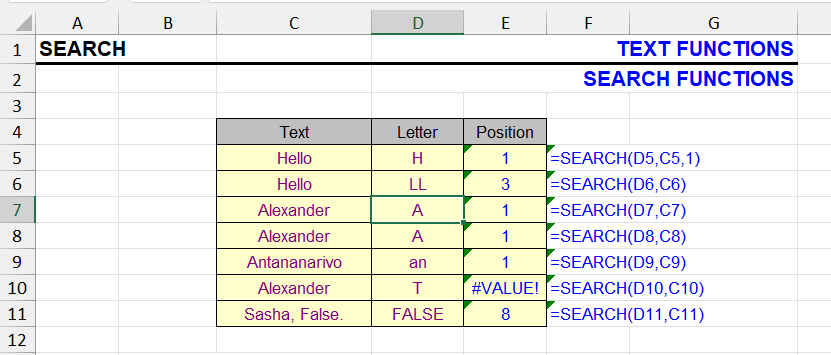
The SEARCH function finds the position of text in a string, not case-sensitive, with wildcards. Syntax, SEARCH vs FIND and ISNUMBER checks.
This function is similar to the FIND function and also searches for a substring within a string. When the search text is found, its position in the text is…
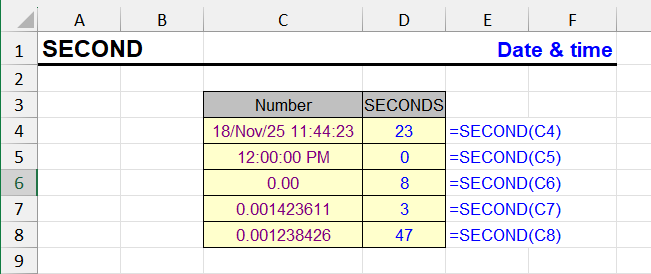
The SECOND function returns the seconds (0–59) from a time value. Syntax, examples and converting time to total seconds in Excel.
The SECOND function in Excel returns the number of seconds from a time value. It extracts a numeric value from 0 to 59 from a given timestamp, ignoring hours…
Generate sequences of numbers, dates and grids with the dynamic array SEQUENCE function in Excel 365 and 2021. Syntax and practical examples.
The SEQUENCE function is available in modern versions of Excel, including Excel for Microsoft 365, Excel 2021 and Excel 2024. It is part of the dynamic array…
The SHEET function returns a sheet number and the SHEETS function counts sheets in a reference. Syntax and examples for dynamic references.
The SHEET and SHEETS functions are used for working with sheets in an Excel workbook. They belong to the information functions category and can be useful when…
Excel statistical functions: the top 20 with examples (COUNT, AVERAGE, MEDIAN, STDEV.S, FREQUENCY, FORECAST) and the full list with versions.
Statistical functions in Excel are a powerful toolkit for data analysis. They calculate averages, the median, the standard deviation and many other statistics…
The SUBSTITUTE function replaces all or the Nth occurrence of text. Nested SUBSTITUTE for several values, removing characters, counting occurrences.
The SUBSTITUTE function allows replacing all occurrences or the Nth occurrence of a substring in text with another text. The substring can be either a single…
The SUMIFS function sums values that meet several conditions: text, numbers, dates, wildcards. Syntax, examples, SUMIFS vs SUMIF vs SUMPRODUCT.
The SUMIFS function is one of the most useful and powerful Excel functions for data analysis. It allows you to sum values from a specific range that meet…
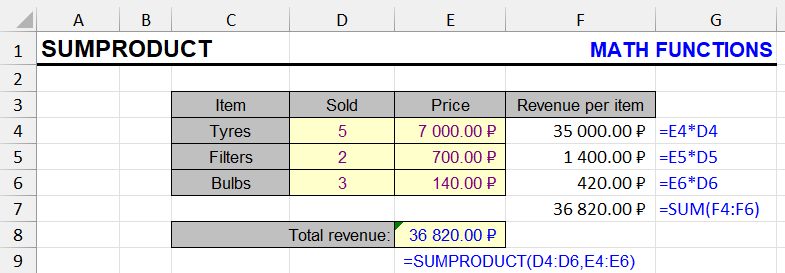
The SUMPRODUCT function multiplies ranges and sums the results. Weighted averages, conditional sums and counts, and its edge over similar functions.
This function uses at least two ranges or arrays, multiplying and summing their elements.
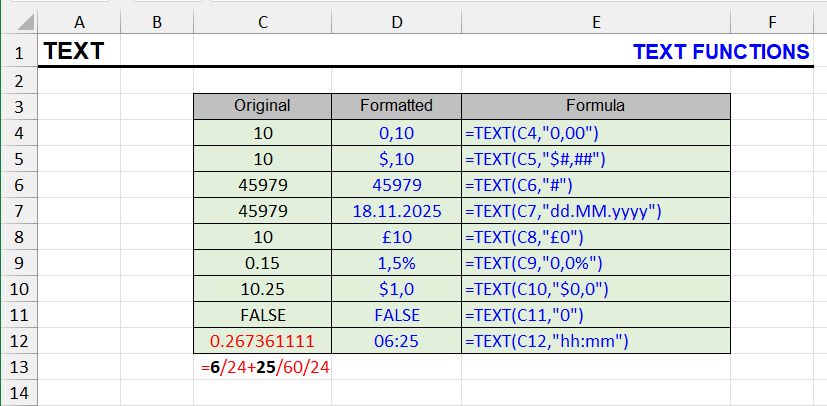
The TEXT function formats numbers, dates and times as text with custom codes. Syntax, format code table, leading zeros and joining formatted values.
The TEXT function converts a number to text in a specified number format.
The Excel TEXTSPLIT function: syntax, split a full name into columns, text into rows, several delimiters, #N/A and pad_with — with interactive examples and the Google Sheets SPLIT equivalent.
The TEXTSPLIT function splits the text in a cell by a delimiter and spills the parts into neighboring cells: =TEXTSPLIT(A2," ") turns “John Michael Smith” into…

The TIME function creates a time from hours, minutes and seconds. Syntax, examples, adding time to dates, and handling values over 24 hours.
The TIME function is used to create a time value in Excel format based on specified hours, minutes, and seconds. This is useful when you want to assemble a time…
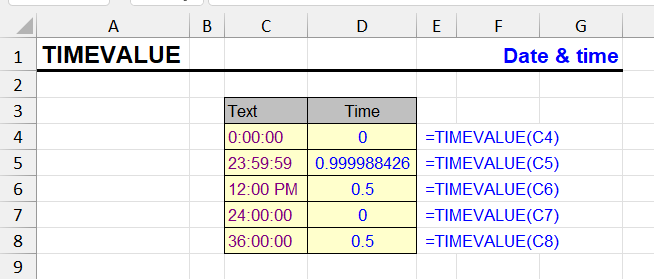
The TIMEVALUE function converts times stored as text into Excel time values. Syntax, supported formats and examples for imported time data.
TIMEVALUE is an Excel function that converts text time values into numeric format. This is especially useful when working with imported or manually entered time…

The TODAY function returns the current date. Days until a deadline, age, differences between dates, and how to fix today's date so it won't change.
The TODAY function returns the current system date of the computer where the file is opened. Time is not considered - the result will be only the date.

The TRIM function removes leading, trailing and repeated spaces. Syntax, examples, and how to remove the non-breaking spaces TRIM leaves.
The TRIM function allows you to remove extra spaces from text.
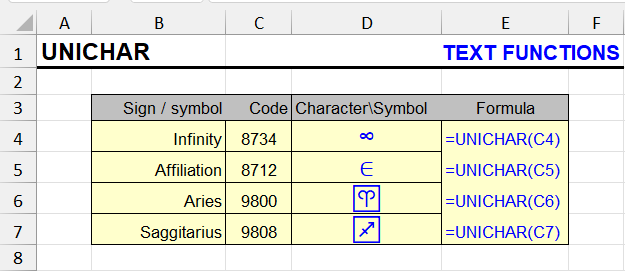
The UNICHAR function returns a Unicode character by code: arrows, checkmarks, emoji, special symbols. Syntax, codes and UNICHAR vs CHAR.
The UNICHAR function returns a character from the UNICODE table by its numeric code. It's especially useful when you need to insert special characters that…
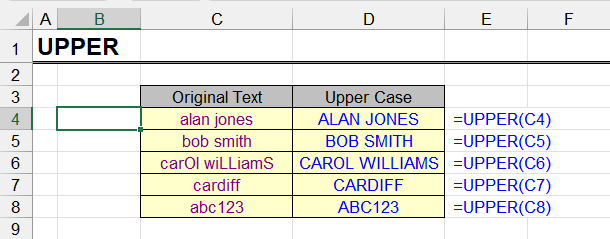
The UPPER function converts lowercase letters to capitals. Syntax, interesting examples, and how to change case without formulas across a range.
This function allows converting lowercase (small) letters to uppercase (capital), in other words, converting them to upper case. Characters already in upper…
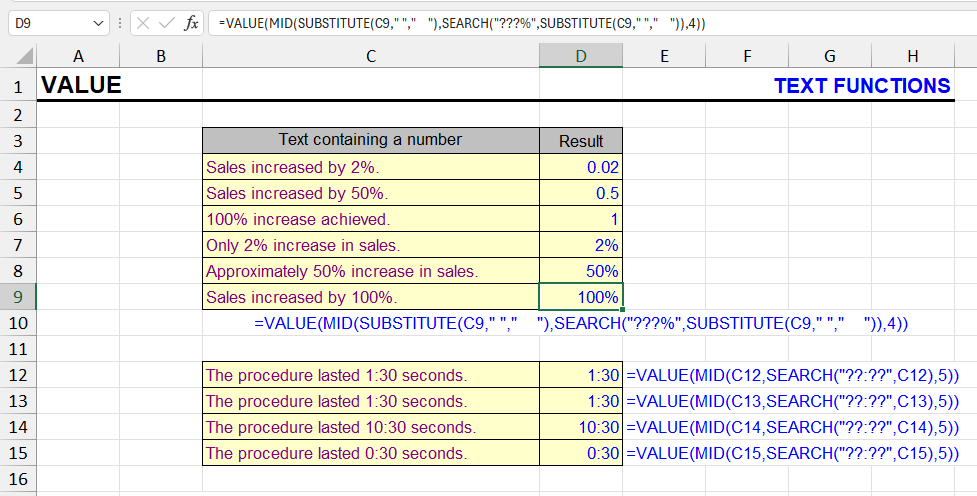
The VALUE function converts numbers stored as text into real numbers. Syntax, examples, regional separators, and other ways to fix text-formatted numbers.
This function converts a piece of text that resembles a number into an actual number.
The VLOOKUP function explained in plain words: syntax, exact and approximate match, lookups from another sheet, #N/A errors and INDEX/MATCH.
The VLOOKUP function (Vertical Lookup) is quite simple to use. There are dozens of examples and even step-by-step tutorials available. However, Excel beginners…

The WEEKDAY function returns the day of the week as a number. Syntax, all return types, getting the day name, and highlighting weekends in Excel.
The WEEKDAY function returns the day of the week corresponding to a date. Depending on the return type you choose, the week can start on Sunday, Monday, or…
The WEEKNUM and ISOWEEKNUM functions return the week number of a date. Syntax, the difference between them, ISO 8601 weeks and report examples.
The functions WEEKNUM and ISOWEEKNUM are used in Excel to determine the week number to which a specific date belongs. They are useful for reporting, weekly…

The WORKDAY function returns a date N working days ahead, skipping weekends and holidays. Syntax, examples and WORKDAY.INTL.
The WORKDAY function in Excel is used to calculate the date that occurs a specified number of working days from a given start date. It takes into account…
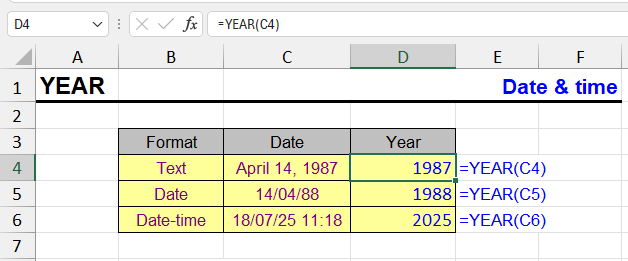
The YEAR function extracts the four-digit year from a date, date-time or text date. Examples for age, grouping by year and building dates.
The YEAR function extracts a four-digit year number from a given date. For example, from date 03/15/2025 it will return value 2025.

The YEARFRAC function returns the share of a year between two dates. Day count basis options and examples for interest, age and tenure.
The YEARFRAC function in Excel returns the fraction of a year between two dates. This is especially useful in financial calculations where you need to account…
What array formulas are, how they work in old Excel (Ctrl+Shift+Enter) and in Excel 365 with dynamic arrays. Examples, array constants and common errors.
Array formulas are one of the most powerful and most misunderstood features of Excel. For years they looked like magic: curly braces, a strange key combination…
How to count characters in several Excel cells at once: LEN, SUM(LEN) and SUMPRODUCT, without spaces, a specific character, and cells longer than N.
Counting characters in Excel cells is quite simple when there are no extra conditions. As soon as they appear, you may need compound formulas and some extra…
Formulas to get the number of days in a month in Excel: by date, month number or month name, the current month, leap years and working days.
The simplest way to count the days in a month in Excel is to find its last day: the number of that day is the number of days in the month. It’s simple, but…
10 ways to make a hyperlink in Excel: Ctrl+K, the HYPERLINK function, links to another sheet, email, Telegram and WhatsApp links, named ranges and files.
In complex workbooks, you often need to insert a link to a cell on another sheet, make links to all sheets of a workbook, or turn a column of URLs into…
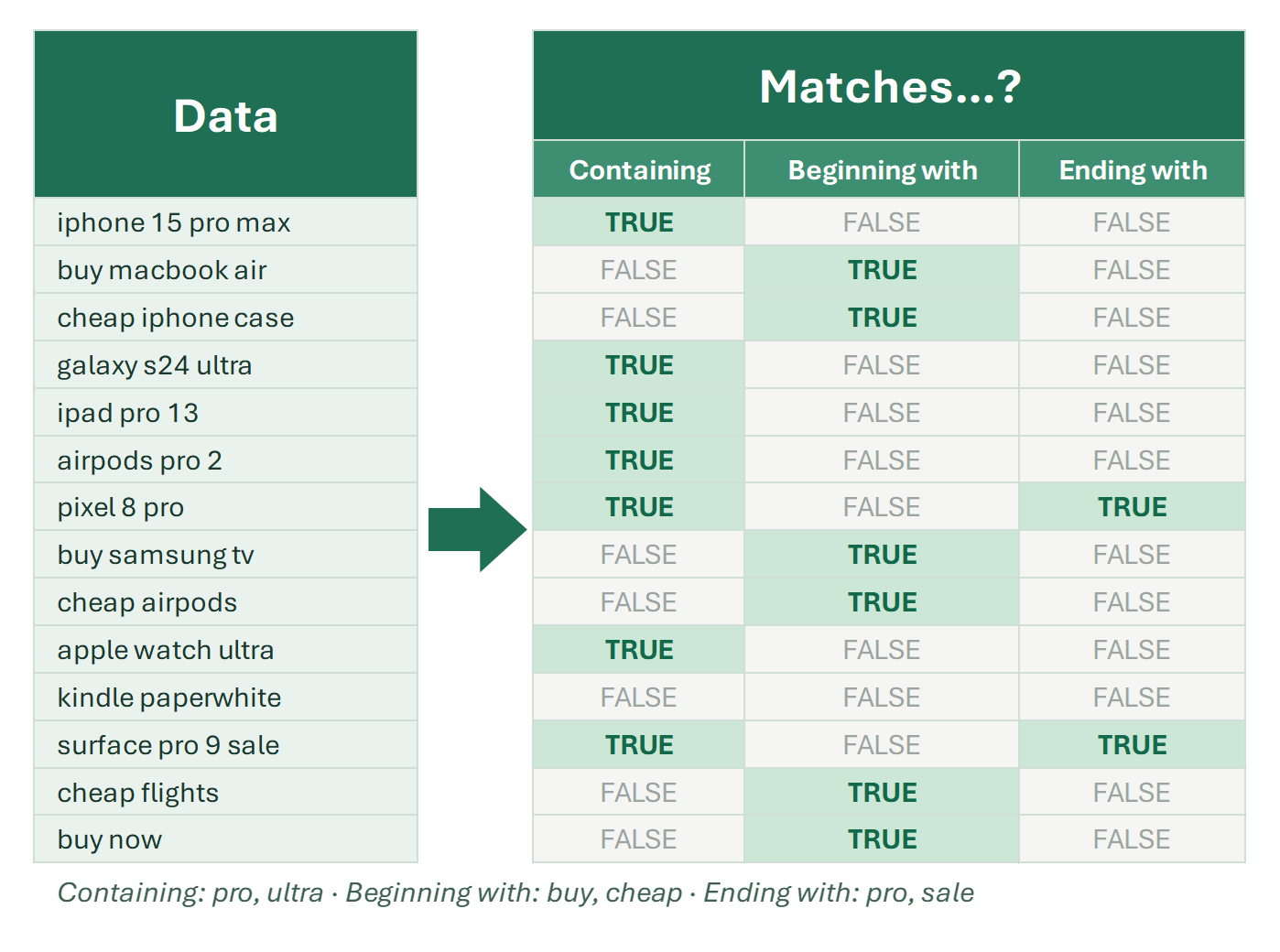
How to find cells by several conditions in Excel: equals, contains, begins or ends with any value from a list. OR, SEARCH, COUNTIF and FILTER formulas.
Finding several values in Excel in one go is not a trivial task. The AutoFilter’s Custom Filter dialog accepts at most two conditions. They can be completely…
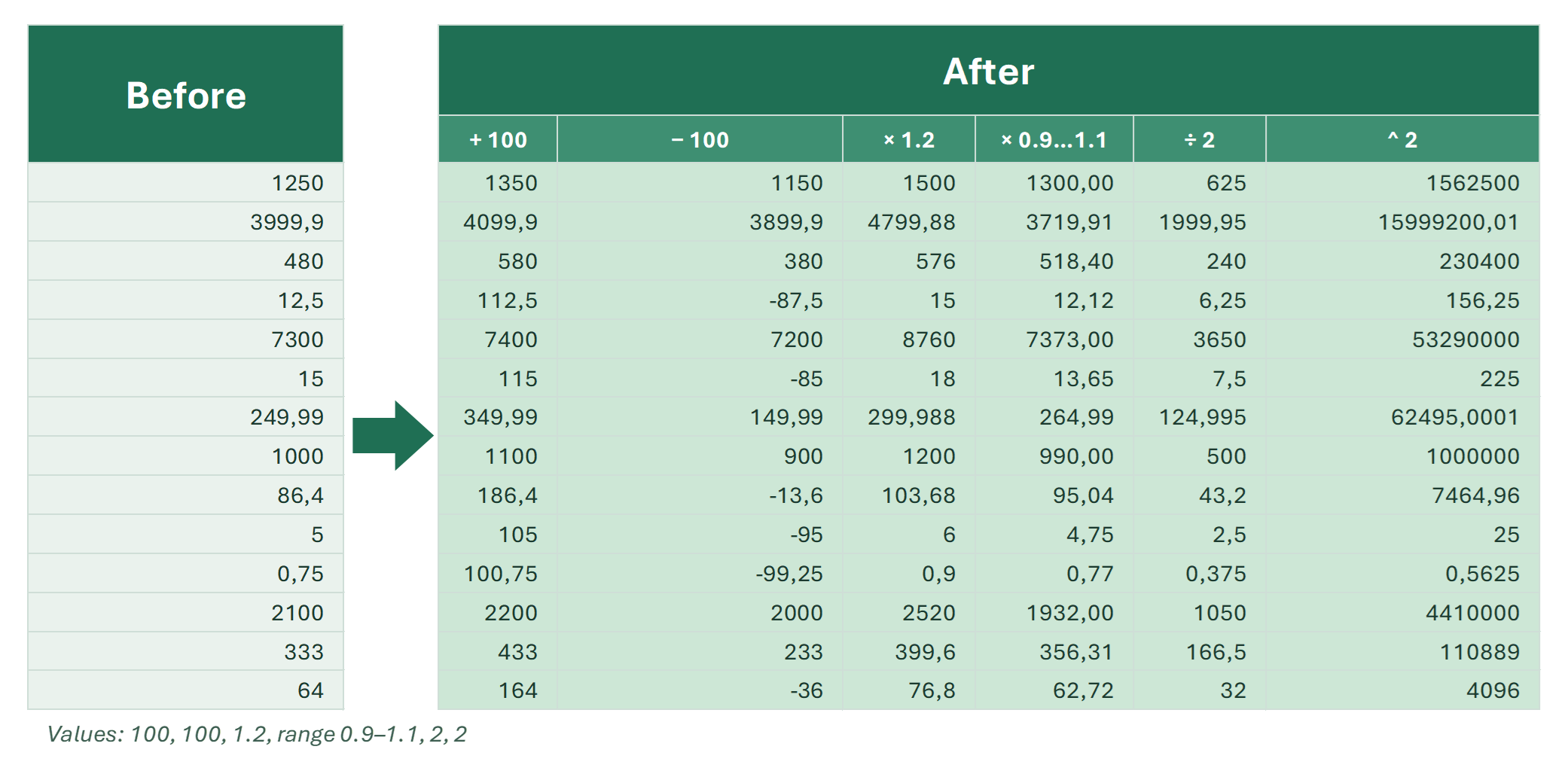
How to add in Excel: the plus operator, SUM, SUMIF and SUMIFS, AutoSum, pivot tables, Paste Special to add a number to a range, adding a percent.
Here are the main ways to add numbers in Excel: how to add two numbers in different cells, how to add a number to a whole range, and how to sum by condition. I…
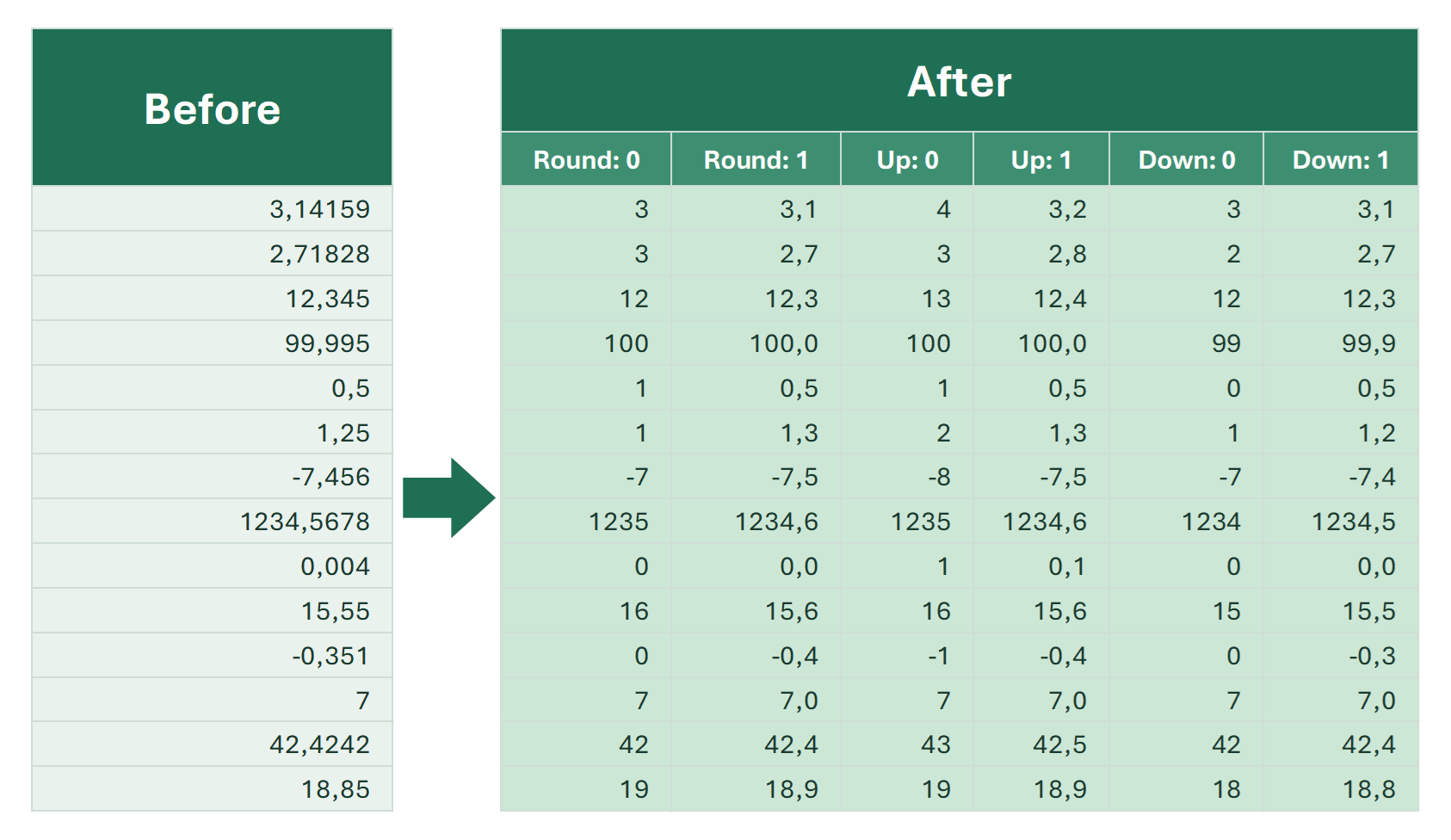
All ways to round in Excel: ROUND, INT, TRUNC, ROUNDUP, ROUNDDOWN, MROUND, CEILING and FLOOR. Negative numbers, dates and times.
Rounding in Excel brings numbers to a simpler form: prices to cents, quantities to whole units, times to the hour. There are quite a few functions for rounding…