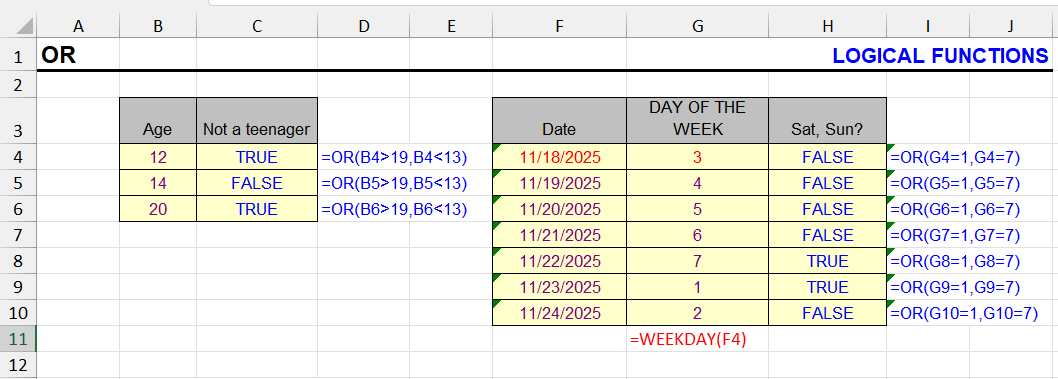
| Function category | Logical functions |
| Volatility | Non-volatile |
| Similar functions | AND — checks if all conditions are true NOT — reverses logical value IF — performs conditional calculations |
What does the OR function do?
The OR function checks whether any of the provided conditions are TRUE. Returns TRUE if at least one condition is met, FALSE if all conditions are FALSE.
This function is essential for creating complex logical tests where multiple possible conditions can lead to the same outcome.
OR: result and input format
The result is a logical value (TRUE or FALSE). The function can handle:
- Numbers and calculations returning numbers
- Logical expressions (TRUE, FALSE) and calculations returning them
- Cell references containing these values
- Cell ranges where at least one cell contains numbers or logical values
- Arrays of values or calculations
Text values and empty cells in ranges are ignored. The function returns an error if all inputs are text/empty or if errors are present in the values.
OR function syntax
=OR(logical1, [logical2], ...)| A | B | C | D | |
|---|---|---|---|---|
| 1 | A | B | Formula | Result |
| 2 | 12 | 7 | =OR(A2>10,B2<5) | TRUE=OR(A2>10,B2<5) |
| 3 | 8 | 3 | =OR(A3>10,B3<5) | TRUE=OR(A3>10,B3<5) |
| 4 | 8 | 7 | =OR(A4>10,B4<5) | FALSE=OR(A4>10,B4<5) |
| 5 | Y | =OR(A5="Yes",A5="Y") | TRUE=OR(A5="Yes",A5="Y") | |
| 6 | text | =OR(A6) | #VALUE!=OR(A6) |
OR returns FALSE only when all conditions are FALSE (row 4). Text compared with “=” works; text passed directly as an argument gives #VALUE!. Comparison ignores case: “y” = “Y”.
Arguments:
- logical1 — required. First condition that can evaluate to TRUE or FALSE
- logical2 — optional. Additional conditions (up to 255 total)
- Conditions can include:
- Comparison operators: =, >, <, <>, >=, <=
- References to cells containing logical values
- Other functions that return logical values
- Arrays of conditions
OR formula examples
Triple-click on the formula will select it entirely for copying.
| Formula | Description | Result |
|---|---|---|
=OR(A1>10, B1<5) | TRUE if A1>10 OR B1<5 | TRUE/FALSE |
=OR(C1="Yes", C1="Y") | TRUE if cell contains "Yes" or "Y" | TRUE/FALSE |
=OR(D1:D10>100) | TRUE if any cell in range exceeds 100 | TRUE/FALSE |
| A | B | C | D | |
|---|---|---|---|---|
| 1 | Sales | Check | Result | |
| 2 | 150 | any > 100 | TRUE=OR(A2:A5>100) | |
| 3 | 80 | any < 50 | FALSE=OR(A2:A5<50) | |
| 4 | 95 | any = 95 | TRUE=OR(A2:A5=95) | |
| 5 | 110 |
A comparison with a range creates an array of TRUE/FALSE, and OR checks if any of them is TRUE. In Excel 2019 and earlier, enter such formulas with Ctrl+Shift+Enter.
OR features and limitations
- Evaluates all conditions even if first condition is TRUE (unlike some programming languages)
- Can be nested with other logical functions for complex decision making
- Often used within IF functions to create multiple condition scenarios
- Accepts array constants for multiple value comparisons
- Useful for data validation, conditional formatting, and complex business rules
Advanced OR formula examples
Acronym Detection
Detect if a word consists only of vowels or only of consonants (common in acronyms):
=OR(
  NOT(OR(ISNUMBER(SEARCH({"a","e","i","o","u","y"}, A1)))),
  NOT(OR(ISNUMBER(SEARCH({"b","c","d","f","g","h","j","k","l","m","n","p","q","r","s","t","v","w","x","z"}, A1))))
)| A | B | |
|---|---|---|
| 1 | Word | Only vowels or only consonants? |
| 2 | HTML | TRUE=OR(NOT(OR(ISNUMBER(SEARCH({"a","e","i","o","u","y"},A2)))),NOT(OR(ISNUMBER(SEARCH({"b","c","d","f","g","h","j","k","l","m","n","p","q","r","s","t","v","w","x","z"},A2))))) |
| 3 | IOU | TRUE=OR(NOT(OR(ISNUMBER(SEARCH({"a","e","i","o","u","y"},A3)))),NOT(OR(ISNUMBER(SEARCH({"b","c","d","f","g","h","j","k","l","m","n","p","q","r","s","t","v","w","x","z"},A3))))) |
| 4 | NASA | FALSE=OR(NOT(OR(ISNUMBER(SEARCH({"a","e","i","o","u","y"},A4)))),NOT(OR(ISNUMBER(SEARCH({"b","c","d","f","g","h","j","k","l","m","n","p","q","r","s","t","v","w","x","z"},A4))))) |
| 5 | BBC | TRUE=OR(NOT(OR(ISNUMBER(SEARCH({"a","e","i","o","u","y"},A5)))),NOT(OR(ISNUMBER(SEARCH({"b","c","d","f","g","h","j","k","l","m","n","p","q","r","s","t","v","w","x","z"},A5))))) |
| 6 | Excel | FALSE=OR(NOT(OR(ISNUMBER(SEARCH({"a","e","i","o","u","y"},A6)))),NOT(OR(ISNUMBER(SEARCH({"b","c","d","f","g","h","j","k","l","m","n","p","q","r","s","t","v","w","x","z"},A6))))) |
The inner ORs check whether the word contains any vowel and any consonant; NOT turns “found” into FALSE. The outer OR returns TRUE if one of the groups is missing: “HTML” has no vowels, “IOU” no consonants. Note that Y is treated as a vowel here.
Grade Check
Check if student has any failing grades (F or F+) in their record:
=OR(A1:A5="F", A1:A5="F+")| A | B | C | D | E | |
|---|---|---|---|---|---|
| 1 | Student | Grade 1 | Grade 2 | Grade 3 | Has F? |
| 2 | Smith | B | F | A | TRUE=OR(B2:D2="F",B2:D2="F+") |
| 3 | Brown | A | B+ | C | FALSE=OR(B3:D3="F",B3:D3="F+") |
| 4 | Jones | F+ | C | B | TRUE=OR(B4:D4="F",B4:D4="F+") |
Each comparison returns an array; OR combines both arrays and returns TRUE if at least one element is TRUE.
OR Symbol in Excel
The mathematical disjunction symbol "∪" can be displayed using:
=UNICHAR(8746)| A | B | |
|---|---|---|
| 1 | Formula | Result |
| 2 | =UNICHAR(8746) | ∪=UNICHAR(8746) |
| 3 | =UNICHAR(8744) | ∨=UNICHAR(8744) |
| 4 | =UNICHAR(8743) | ∧=UNICHAR(8743) |
∪ is union, ∨ is logical OR (disjunction), ∧ is logical AND. These are just characters for labels and headers.
This is for display purposes only and cannot be used in formulas.
Other Logical functions in Excel
IF, AND, NOT, TRUE, FALSE, IFERROR, IFS, SWITCH, XOR
See also:
Like the article? Help its author! Buy !SEMTools, it has lots of useful instruments to process text data.