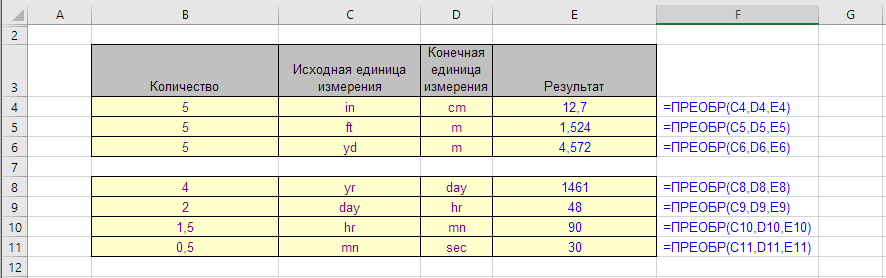
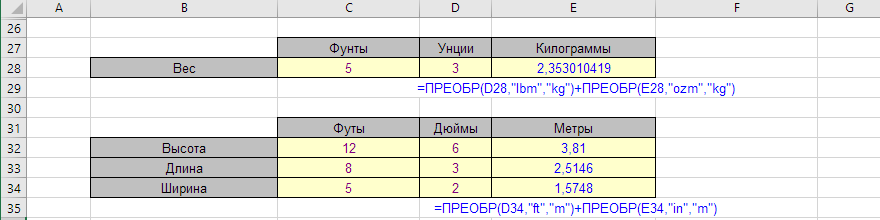
Converting inches to centimeters, feet and yards to meters, years to days, days to hours, hours to minutes and minutes to seconds using the CONVERT function in Excel.
This function converts a numerical value from one unit type to its equivalent expressed in another unit type.
For example, it can convert 7 inches to centimeters or 30 pounds to kilograms.
The input value must be numeric; for text and logical values, it returns a #VALUE! error.
CONVERT - syntax
=CONVERT(number, from_unit, to_unit)
CONVERT: units in quotes, case matters
D2fx=CONVERT(A2,"in","cm")
A
B
C
D
1
Number
From
To
CONVERT
2
7
"in"
"cm"
17.78=CONVERT(A2,"in","cm")
3
30
"lbm"
"kg"
13.6077711=CONVERT(A3,"lbm","kg")
4
100
"F"
"C"
37.7777778=CONVERT(A4,"F","C")
5
1
"mi"
"km"
1.609344=CONVERT(A5,"mi","km")
6
1
"yr"
"day"
365.25=CONVERT(A6,"yr","day")
7
5
"Kg"
"g"
#N/A=CONVERT(A7,"Kg","g")
Unit names are case-sensitive: "kg" works, "Kg" returns #N/A. The same #N/A appears when the units measure different things, e.g. "kg" to "m".
Formula examples with the CONVERT function
The following table was used by an import/export company to convert package weights and dimensions from the old UK measurement system to the European system.
Package weights and sizes: imperial → metric
C2fx=ROUND(CONVERT(B2,"lbm","kg"),2)
A
B
C
D
E
F
G
1
Package
Weight, lb
kg
Length, in
cm
Width, in
cm
2
Box A
12.5
5.67=ROUND(CONVERT(B2,"lbm","kg"),2)
18
45.72=CONVERT(D2,"in","cm")
10
25.4=CONVERT(F2,"in","cm")
3
Box B
3.2
1.45=ROUND(CONVERT(B3,"lbm","kg"),2)
9
22.86=CONVERT(D3,"in","cm")
6
15.24=CONVERT(F3,"in","cm")
4
Tube
0.8
0.36=ROUND(CONVERT(B4,"lbm","kg"),2)
24
60.96=CONVERT(D4,"in","cm")
3
7.62=CONVERT(F4,"in","cm")
One pound is exactly 0.45359237 kg and one inch is exactly 2.54 cm, so CONVERT gives the same result as multiplying — but the formula says what it does, and the units are easy to change.
Metric and binary prefixes
B2fx=CONVERT(5,"km","mi")
A
B
C
1
Formula
Result
Prefix
2
=CONVERT(5,"km","mi")
3.10685596=CONVERT(5,"km","mi")
k = kilo
3
=CONVERT(250,"mg","ozm")
0.00881849=CONVERT(250,"mg","ozm")
m = milli
4
=CONVERT(1,"Gbyte","bit")
8000000000=CONVERT(1,"Gbyte","bit")
G = giga (10^9)
5
=CONVERT(1,"Gibyte","Mibyte")
1024=CONVERT(1,"Gibyte","Mibyte")
Gi, Mi = binary 2^30, 2^20
6
=CONVERT(90,"mn","hr")
1.5=CONVERT(90,"mn","hr")
time units: no prefix
Metric prefixes (k, M, G, m, u…) can be added to metric units like "m", "g", "byte". For information units there are also binary prefixes: "Ki", "Mi", "Gi".
CONVERT unit abbreviations
The abbreviations used are case-sensitive and must be entered in the same case as in the tables below.