| Function category | Date and time functions |
| Volatility | Non-volatile |
| Similar functions | EOMONTH |
What does the EDATE function do?
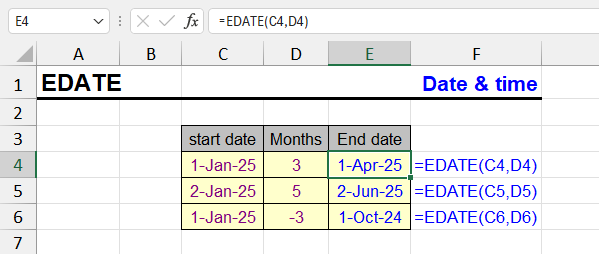
The EDATE function in Excel is used to calculate a date that is a specified number of months before or after a given date. This is particularly useful for calculating payment schedules, deferrals, or subscription periods.
EDATE: result and input format
The result is typically expressed as a serial number that can be formatted to display as a date using the "Format Cells" procedure.
EDATE function syntax
=EDATE(start_date, months)- start_date — the date from which to start counting
- months — the number of months to shift the date (can be negative)
EDATE - formula examples
=EDATE(A1, 1)| A | B | C | |
|---|---|---|---|
| 1 | Start date | Months | EDATE |
| 2 | 01/15/2025 | 3 | 04/15/2025=EDATE(A2,B2) |
| 3 | 03/31/2025 | -1 | 02/28/2025=EDATE(A3,B3) |
| 4 | 01/31/2024 | 1 | 02/29/2024=EDATE(A4,B4) |
| 5 | 01/31/2023 | 1 | 02/28/2023=EDATE(A5,B5) |
| 6 | 10/22/2026 | -6 | 04/22/2026=EDATE(A6,B6) |
| 7 | 10/22/2026 | 1.9 | 11/22/2026=EDATE(A7,B7) |
If the day doesn’t exist in the target month, EDATE takes the last day: Jan 31 + 1 month is Feb 29 in 2024 and Feb 28 in 2023. A fractional number of months is truncated: 1.9 → 1. Format the result cell as a date, otherwise you see a serial number.
Adds 1 month to the date in cell A1.
=EDATE(TODAY(), -6)Returns the date 6 months before today (TODAY function).
Practical examples of EDATE
| Formula | Description | Result (example) |
|---|---|---|
=EDATE("01/15/2025", 3) | 3 months after January 15, 2025 | 04/15/2025 |
=EDATE("03/31/2025", -1) | 1 month before March 31, 2025 | 02/28/2025 |
=EDATE(TODAY(), 12) | 1 year from today | 10/22/2027 (if today is 10/22/2026) |
| A | B | C | |
|---|---|---|---|
| 1 | Payment # | Due date | Months from start |
| 2 | 1 | 01/31/2026=EDATE(DATE(2026,1,31),A2-1) | 0 |
| 3 | 2 | 02/28/2026=EDATE(DATE(2026,1,31),A3-1) | 1 |
| 4 | 3 | 03/31/2026=EDATE(DATE(2026,1,31),A4-1) | 2 |
| 5 | 4 | 04/30/2026=EDATE(DATE(2026,1,31),A5-1) | 3 |
| 6 | 5 | 05/31/2026=EDATE(DATE(2026,1,31),A6-1) | 4 |
| 7 | 6 | 06/30/2026=EDATE(DATE(2026,1,31),A7-1) | 5 |
Each due date is counted from the same start (Jan 31), not from the previous payment, so after February the dates go back to the 31st where it exists. Counting from the previous row would “stick” to the 28th.
EDATE features and limitations
If the resulting date falls on a day number that doesn't exist in the new month, Excel returns the last day of that month. For example, EDATE("01/31/2024", 1) → 02/29/2024. This makes the function particularly convenient for calculating end dates in schedules with regular payments.
Common use cases of EDATE
- Loan payment schedules and amortization tables
- Subscription renewal dates
- Contract expiration calculations
- Project milestone planning
- Employee probation period endings
- Warranty and service contract dates
EDATE: important notes
- EDATE handles month-end dates intelligently (e.g., January 31 + 1 month = February 28/29)
- Negative values for months calculate dates in the past
- The function works with Excel's date serial number system
- Start_date must be a valid Excel date or serial number
- Months argument can be fractional but will be truncated to integer
Other Date and Time functions in Excel
TIMEVALUE, TIME, YEAR, DATE, DATEVALUE, DAY, WEEKDAY, YEARFRAC, EOMONTH, MONTH, MINUTE, WEEKNUM and ISOWEEKNUM, WORKDAY, DATEDIF, TODAY, SECOND, NOW, HOUR, NETWORKDAYS
Like the article? Help its author! Buy !SEMTools, it has lots of useful instruments to process text data.