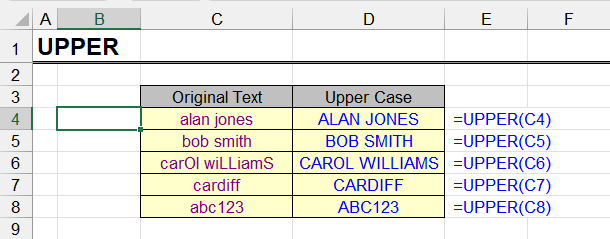
| Function category | Text |
| Volatility | Non-volatile |
| Similar functions | LOWER, PROPER |
| Similar functionality | Change letter case |
What does the UPPER function do?
This function allows converting lowercase (small) letters to uppercase (capital), in other words, converting them to upper case. Characters already in upper case and characters for which this is not applicable remain unchanged.
UPPER function syntax
=UPPER(text)| A | B | |
|---|---|---|
| 1 | Text | UPPER |
| 2 | hello world | HELLO WORLD=UPPER(A2) |
| 3 | Excel 365 | EXCEL 365=UPPER(A3) |
| 4 | straße | STRAßE=UPPER(A4) |
| 5 | café №5 | CAFÉ №5=UPPER(A5) |
Digits, spaces and symbols stay as they are; letters with diacritics change too. Note “ß”: Excel 365 leaves it unchanged — Python and some other tools turn it into “SS”.
UPPER: result and input format
See PROPER
First words of cells entirely in uppercase ("caps")
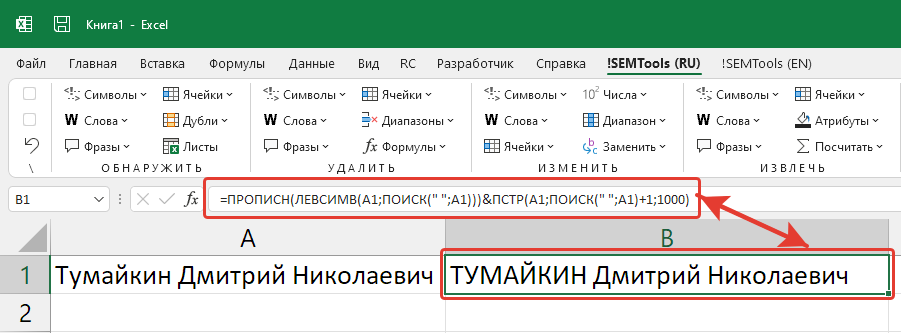
This is most often useful when working with full names in Excel. Surnames are usually written entirely in uppercase, while first and middle names are simply capitalized.
Let's assume that in the original list all words are already capitalized. Then the formula will require getting the first word of the cell (in this case the surname), converting it to uppercase and adding the remaining words (first and middle names) to it.
The formula will look like this:
=UPPER(LEFT(A1, SEARCH(" ", A1))) & MID(A1, SEARCH(" ", A1) + 1, 1000)| A | B | |
|---|---|---|
| 1 | Full name | Surname in caps |
| 2 | Smith John | SMITH John=UPPER(LEFT(A2,SEARCH(" ",A2)))&MID(A2,SEARCH(" ",A2)+1,1000) |
| 3 | Garcia Maria Elena | GARCIA Maria Elena=UPPER(LEFT(A3,SEARCH(" ",A3)))&MID(A3,SEARCH(" ",A3)+1,1000) |
| 4 | Lee Ann | LEE Ann=UPPER(LEFT(A4,SEARCH(" ",A4)))&MID(A4,SEARCH(" ",A4)+1,1000) |
LEFT takes the first word together with the space, UPPER capitalizes it, and MID adds the rest of the text unchanged.
Capitalize the first letter of a cell
It might seem simple, but finding that very first letter in a cell is quite a problem that deserves its own article. This formula finds the position of the first letter (the first character that has an upper and a lower case); the array formula is from there:
{=MATCH(FALSE, EXACT(MID(LOWER(A1), ROW(INDIRECT("1:" & LEN(A1))), 1), MID(UPPER(A1), ROW(INDIRECT("1:" & LEN(A1))), 1)), 0)}
| A | B | C | |
|---|---|---|---|
| 1 | Text | First letter position | Capitalized |
| 2 | «quoted» text | 2=MATCH(FALSE,EXACT(MID(LOWER(A2),ROW(INDIRECT("1:"&LEN(A2))),1),MID(UPPER(A2),ROW(INDIRECT("1:"&LEN(A2))),1)),0) | «Quoted» text=REPLACE(A2,B2,1,UPPER(MID(A2,B2,1))) |
| 3 | 2 apples | 3=MATCH(FALSE,EXACT(MID(LOWER(A3),ROW(INDIRECT("1:"&LEN(A3))),1),MID(UPPER(A3),ROW(INDIRECT("1:"&LEN(A3))),1)),0) | 2 Apples=REPLACE(A3,B3,1,UPPER(MID(A3,B3,1))) |
| 4 | - item | 3=MATCH(FALSE,EXACT(MID(LOWER(A4),ROW(INDIRECT("1:"&LEN(A4))),1),MID(UPPER(A4),ROW(INDIRECT("1:"&LEN(A4))),1)),0) | - Item=REPLACE(A4,B4,1,UPPER(MID(A4,B4,1))) |
| 5 | hello | 1=MATCH(FALSE,EXACT(MID(LOWER(A5),ROW(INDIRECT("1:"&LEN(A5))),1),MID(UPPER(A5),ROW(INDIRECT("1:"&LEN(A5))),1)),0) | Hello=REPLACE(A5,B5,1,UPPER(MID(A5,B5,1))) |
The formula splits the text into characters and compares the lowercase and uppercase version of each one. They differ only for letters, so MATCH returns the position of the first letter. REPLACE then puts the capital letter at that position.
Capitalize first letters of sentences in Excel
The formula above will capitalize only one, the first letter of the cell.
What if we want to capitalize the first letters of sentences, of which there may be several in a cell? This formula won't identify the first letter of the second sentence and beyond, and therefore won't solve the problem.
Is there a solution? Yes! It's offered by my !SEMTools add-in for Excel. Read more here - change letter case in Excel.
Like the article? Help its author! Buy !SEMTools, it has lots of useful instruments to process text data.