| Function category | Engineering functions |
| Volatility | Non-volatile |
| Similar functions | BIN2DEC, DEC2HEX, HEX2DEC |
What does the DEC2BIN function do?
This function converts a decimal number to its binary equivalent.
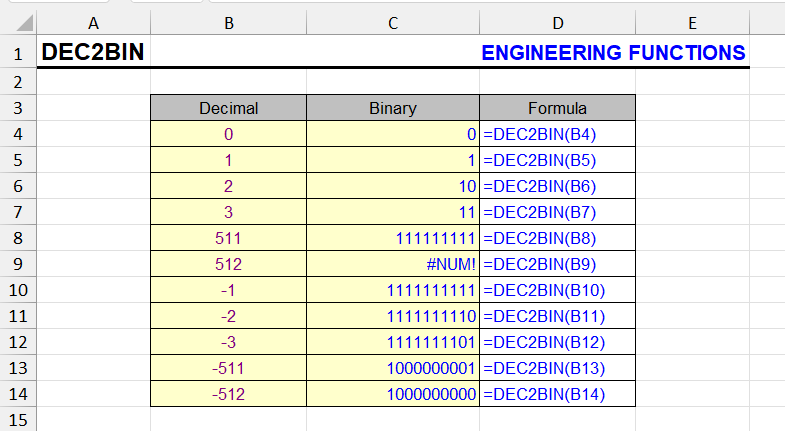
It can only work with decimal numbers from -512 to 511.
The result can be padded with leading zeros using the second parameter.
DEC2BIN function syntax
=DEC2BIN(decimal_number, [places])Places - optional parameter. Ignored for negative numbers (they always have 10 digits).
- decimal_number — required. The decimal integer you want to convert to binary
- places — optional. The number of characters to use. If omitted, uses the minimum number necessary
DEC2BIN formula examples
Convert decimal 10 to binary:
=DEC2BIN(10)Result: "1010"
Convert decimal 5 to binary with 8 characters:
=DEC2BIN(5, 8)Result: "00000101"
Convert negative decimal number:
=DEC2BIN(-10)| A | B | C | |
|---|---|---|---|
| 1 | Decimal | Places | DEC2BIN |
| 2 | 10 | 1010=DEC2BIN(A2) | |
| 3 | 5 | 8 | 00000101=DEC2BIN(A3,B3) |
| 4 | 255 | 11111111=DEC2BIN(A4) | |
| 5 | 511 | 111111111=DEC2BIN(A5) | |
| 6 | -10 | 1111110110=DEC2BIN(A6) | |
| 7 | -1 | 1111111111=DEC2BIN(A7) | |
| 8 | -512 | 1000000000=DEC2BIN(A8) | |
| 9 | 512 | #NUM!=DEC2BIN(A9) | |
| 10 | 10 | 2 | #NUM!=DEC2BIN(A10,B10) |
Negative numbers always come out as 10 characters in two’s complement: −1 is 1111111111, −512 is 1000000000. 512 is out of range, and 2 places are too few for 1010 — both give #NUM!. The result is text.
Result: "1111110110" — 10 bits in two’s complement
DEC2BIN features and limitations
- Negative numbers are represented using two's complement notation with 10 bits
- The places parameter is ignored for negative numbers
- If places is too small, returns the #NUM! error
- If decimal_number is less than -512 or greater than 511, returns the #NUM! error
- If decimal_number is nonnumeric, returns the #VALUE! error
- If places is nonnumeric, returns the #VALUE! error
- If places is not an integer, it is truncated
- If places is negative, returns the #NUM! error
Other Engineering functions in Excel
BIN2DEC, BIN2HEX, CONVERT, DEC2HEX, DEC2OCT, DELTA, GESTEP, HEX2BIN, HEX2DEC, OCT2DEC
Like the article? Help its author! Buy !SEMTools, it has lots of useful instruments to process text data.