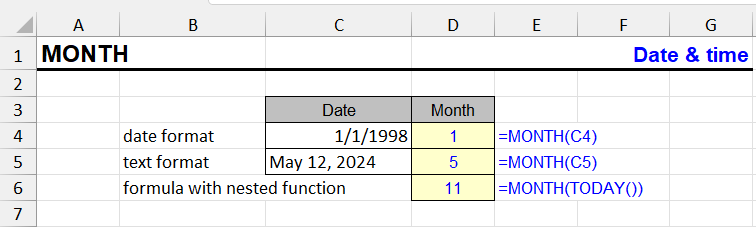
| Function category | Date and time functions |
| Volatility | Non-volatile |
| Similar functions | DAY — returns day of month YEAR — returns year WEEKDAY — returns day of week number TEXT — can return month name as text |
What does the MONTH function do?
The MONTH function returns the month number from a given date. The result will be a number from 1 to 12.
Examples:
- June 17, 2025 → 6
- 01/01/2024 → 1
The function is used to extract the month from a full date for subsequent grouping, filtering, comparison, and sorting.
MONTH function syntax
=MONTH(date)MONTH: result and input format
The function returns a regular integer. If necessary, you can configure the cell's number format (for example, remove decimal places), but usually this is not required.
If you want to get the month name (for example, "January"), use the TEXT function:
=TEXT(A2, "mmmm")| A | B | C | D | E | |
|---|---|---|---|---|---|
| 1 | Date | MONTH | Name | Short | Quarter |
| 2 | 06/17/2025 | 6=MONTH(A2) | June=TEXT(A2,"mmmm") | Jun=TEXT(A2,"mmm") | Q2="Q"&ROUNDUP(MONTH(A2)/3,0) |
| 3 | 01/01/2024 | 1=MONTH(A3) | January=TEXT(A3,"mmmm") | Jan=TEXT(A3,"mmm") | Q1="Q"&ROUNDUP(MONTH(A3)/3,0) |
| 4 | 10/22/2026 | 10=MONTH(A4) | October=TEXT(A4,"mmmm") | Oct=TEXT(A4,"mmm") | Q4="Q"&ROUNDUP(MONTH(A4)/3,0) |
| 5 | 12/05/2026 | 12=MONTH(A5) | December=TEXT(A5,"mmmm") | Dec=TEXT(A5,"mmm") | Q4="Q"&ROUNDUP(MONTH(A5)/3,0) |
MONTH returns a number; TEXT with "mmmm" or "mmm" gives the name. ROUNDUP(MONTH/3,0) turns the month into a quarter. The names follow the Excel language.
Argument:
- date — required argument. This can be:
- reference to a cell containing a date
- date returned by another function (for example, TODAY())
- text string that Excel can convert to a date (for example, "2025-12-31")
MONTH formula examples
=MONTH(A2)=MONTH(TODAY())| A | B | C | D | E | |
|---|---|---|---|---|---|
| 1 | Date | Amount | Month | Total | |
| 2 | 01/15/2026 | 500 | 1 | 500=SUMPRODUCT((MONTH($A$2:$A$6)=D2)*$B$2:$B$6) | |
| 3 | 02/03/2026 | 300 | 2 | 750=SUMPRODUCT((MONTH($A$2:$A$6)=D3)*$B$2:$B$6) | |
| 4 | 02/20/2026 | 450 | 10 | 950=SUMPRODUCT((MONTH($A$2:$A$6)=D4)*$B$2:$B$6) | |
| 5 | 10/01/2026 | 700 | |||
| 6 | 10/18/2026 | 250 | |||
| 7 | This month | 950=SUMPRODUCT((MONTH(A2:A6)=MONTH(TODAY()))*(YEAR(A2:A6)=YEAR(TODAY()))*B2:B6) |
MONTH inside SUMPRODUCT checks every date at once. For data across several years, also compare YEAR — otherwise October 2025 and October 2026 add up together. “This month” is shown for 10/22/2026.
| Date | Formula | Result |
|---|---|---|
| 02/15/2025 | =MONTH(A2) | 2 |
| =TODAY() | =MONTH(TODAY()) | (current month) |
| – | =MONTH("2025-12-31") | 12 |
MONTH features and limitations
- If the date is entered as text, Excel must be able to recognize it. Otherwise, an error will occur.
- The function does not return the month name, only its number.
- If no date is specified or the cell is empty, the result will be 0.
Other Date and Time functions in Excel
TIMEVALUE, TIME, YEAR, DATE, DATEVALUE, EDATE, DAY, WEEKDAY, YEARFRAC, EOMONTH, MINUTE, WEEKNUM and ISOWEEKNUM, WORKDAY, DATEDIF, TODAY, SECOND, NOW, HOUR, NETWORKDAYS
Like the article? Help its author! Buy !SEMTools, it has lots of useful instruments to process text data.