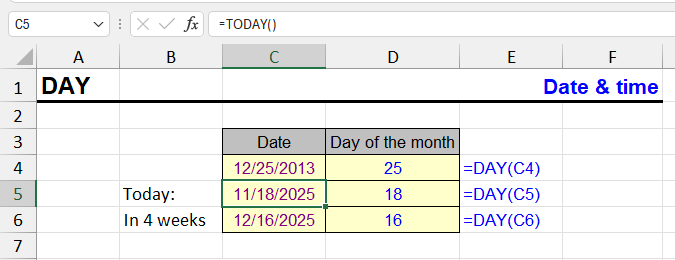
| Function category | Date and time functions |
| Volatility | Non-volatile |
| Similar functions | MONTH — returns month number YEAR — returns year DATE — creates date from three numbers WEEKDAY — returns day of week |
What does the DAY function do?
The DAY function returns the day of the month from a given date. The result is always a number between 1 and 31.
Examples:
- =DAY("2025-06-17") → 17
- =DAY(A2) → if A2 contains 01/01/2024, result will be 1
This function is useful when you need to group or filter data by day of month, for example - to find all events that occurred on the "first day" of any month.
DAY: result and input format
DAY() returns an integer that can be immediately used in calculations, filtering, or visualization. No additional formatting is required.
If the result displays as a date, simply change the cell format to "General" or "Number" (Ctrl+1 → Number).
DAY function syntax
=DAY(date)
Date is the only required argument. It can be:
- reference to a cell containing a date (A1);
- result of another function (TODAY(), DATE(2025,1,1));
- text string with a date (e.g., "2025-01-01"), though this is not recommended.
DAY formula examples
=DAY(A2)
=DAY(TODAY())
=DAY("2025-12-31")
| A | B | |
|---|---|---|
| 1 | Value | DAY |
| 2 | 06/17/2025 | 17=DAY(A2) |
| 3 | 01/01/2024 | 1=DAY(A3) |
| 4 | 2025-12-31 (text) | 31=DAY(A4) |
| 5 | 10/22/2026 18:30 | 22=DAY(A5) |
| 6 | (empty) | 0=DAY(A6) |
| 7 | not a date | #VALUE!=DAY(A7) |
Time is ignored. Text in the ISO form 2025-12-31 is recognized in any locale. An empty cell gives 0 (day 0 is “January 0, 1900”), unrecognized text gives #VALUE!.
| Date | Formula | Result |
|---|---|---|
| 06/15/2025 | =DAY(A2) | 15 |
| =TODAY() | =DAY(TODAY()) | (current day of month) |
| — | =DAY("2025-12-31") | 31 |
Practical examples of DAY
- Calculate due dates based on day of month
- Filter transaction data by specific days
- Generate monthly reports grouped by day
- Calculate age in days from birth dates
- Track project milestones by day
DAY features and limitations
- The DAY function returns only the day number of the month, regardless of the date display format
- If the argument is unrecognizable text, Excel returns #VALUE! error
- If an empty cell is passed, the result is 0
- Works with dates from January 1, 1900 to December 31, 9999
- Returns values from 1 to 31 (depending on the month and year)
Combining DAY with other date functions
The DAY function is often used with MONTH and YEAR to extract all date components:
=DAY(A1) & "/" & MONTH(A1) & "/" & YEAR(A1)
| A | B | C | D | |
|---|---|---|---|---|
| 1 | Date | D/M/YYYY | Days in month | First day of month |
| 2 | 10/22/2026 | 22/10/2026=DAY(A2)&"/"&MONTH(A2)&"/"&YEAR(A2) | 31=DAY(EOMONTH(A2,0)) | 10/01/2026=A2-DAY(A2)+1 |
| 3 | 02/10/2028 | 10/2/2028=DAY(A3)&"/"&MONTH(A3)&"/"&YEAR(A3) | 29=DAY(EOMONTH(A3,0)) | 02/01/2028=A3-DAY(A3)+1 |
| 4 | 01/31/2026 | 31/1/2026=DAY(A4)&"/"&MONTH(A4)&"/"&YEAR(A4) | 31=DAY(EOMONTH(A4,0)) | 01/01/2026=A4-DAY(A4)+1 |
Joining DAY, MONTH and YEAR builds a day-first date as text (no leading zeros). DAY of the month end is the number of days in the month, and date − DAY(date) + 1 is the first day of the month.
Other Date and Time functions in Excel
TIMEVALUE, TIME, YEAR, DATE, DATEVALUE, EDATE, WEEKDAY, YEARFRAC, EOMONTH, MONTH, MINUTE, WEEKNUM and ISOWEEKNUM, WORKDAY, DATEDIF, TODAY, SECOND, NOW, HOUR, NETWORKDAYS
Like the article? Help its author! Buy !SEMTools, it has lots of useful instruments to process text data.