| Function category | Date and time functions |
| Volatility | Non-volatile |
| Similar functions | DATE — creates date from numbers DAY, MONTH, YEAR — extract date parts TODAY, NOW — return current date and current date-time |
What does the EOMONTH function do?
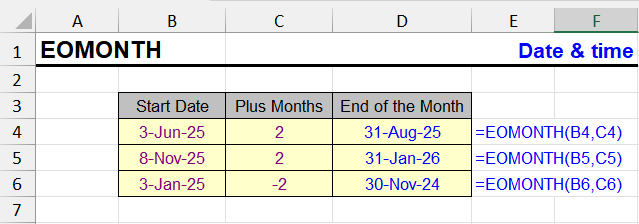
The EOMONTH function returns the last date of the month, shifted by a specified number of months from the original date.
If the offset is 0, the end of the same month will be returned. If 1 — end of next month, -1 — end of previous month.
EOMONTH: result and input format
The result is a date. It can be displayed in standard or custom format. If necessary, you can change the display format via Ctrl + 1.
EOMONTH function syntax
=EOMONTH(start_date, months)Arguments:
- start_date — required argument. This can be:
- reference to a cell containing a date
- result of another function, for example TODAY()
- text value that Excel recognizes as a date
- months — required integer (can be negative), specifying how many months to move forward or backward
EOMONTH formula examples
Triple-click on the formula will select it entirely for copying.
| Formula | Description | Result (example) |
|---|---|---|
=EOMONTH("06/10/2025", 0) | End of current month | 06/30/2025 |
=EOMONTH("06/10/2025", 1) | End of next month | 07/31/2025 |
=EOMONTH(TODAY(), -1) | End of previous month | 05/31/2025 |
| A | B | C | |
|---|---|---|---|
| 1 | Date | Months | EOMONTH |
| 2 | 06/10/2025 | 0 | 06/30/2025=EOMONTH(A2,B2) |
| 3 | 06/10/2025 | 1 | 07/31/2025=EOMONTH(A3,B3) |
| 4 | 10/22/2026 | -1 | 09/30/2026=EOMONTH(A4,B4) |
| 5 | 01/15/2028 | 1 | 02/29/2028=EOMONTH(A5,B5) |
| 6 | 10/22/2026 | 12 | 10/31/2027=EOMONTH(A6,B6) |
| 7 | 10/22/2026 | 1.7 | 11/30/2026=EOMONTH(A7,B7) |
0 is the end of the same month, 1 the next one, −1 the previous one. February 2028 has 29 days. A fractional offset is truncated (1.7 → 1). Format the result as a date — otherwise you see a serial number.
| A | B | C | |
|---|---|---|---|
| 1 | Formula | Result for 10/22/2026 | What it is |
| 2 | =EOMONTH(A2,-1)+1 | 10/01/2026=EOMONTH(A2,-1)+1 | first day of the month |
| 3 | =DAY(EOMONTH(A2,0)) | 31=DAY(EOMONTH(A2,0)) | days in the month |
| 4 | =EOMONTH(A2,0)-A2 | 9=EOMONTH(A2,0)-A2 | days left in the month |
| 5 | =EOMONTH(A2,-MOD(MONTH(A2)-1,3)+2) | 12/31/2026=EOMONTH(A2,-MOD(MONTH(A2)-1,3)+2) | end of the quarter |
The end of the previous month + 1 is the first day of the current month. DAY of the month end is the number of days in the month — 31 for October, 28 or 29 for February.
EOMONTH features and limitations
- If the date is entered incorrectly, Excel will return an error.
- Leap years are taken into account: February can have 28 or 29 days.
- The function is useful for calculating periods, financial reports, month-end closing dates, deferral calculations, etc.
- Despite Excel considering 1900 a leap year and having February 29, 1900, the EOMONTH function for all February 1900 dates (even February 29) returns February 28.
Automate EOMONTH tasks with !SEMTools
If you want to get the last date of the month for an entire column at once, you can use the command on the !SEMTools tab.
How to use:
- Select the column with dates;
- Open the !SEMTools tab;
- Go to menu "EXTRACT" - "Attributes" - dates
- Select the "End of month" command.
If the "output result to the right" checkbox is active, a column with the last dates of the corresponding months will appear next to it. Only values are inserted, without formulas.
Other Date and Time functions in Excel
TIMEVALUE, TIME, YEAR, DATE, DATEVALUE, EDATE, DAY, WEEKDAY, YEARFRAC, MONTH, MINUTE, WEEKNUM and ISOWEEKNUM, WORKDAY, DATEDIF, TODAY, SECOND, NOW, HOUR, NETWORKDAYS
Like the article? Help its author! Buy !SEMTools, it has lots of useful instruments to process text data.