| Function category | Engineering |
| Volatility | Non-volatile |
| Similar functions | DELTA |
What does the GESTEP function do?
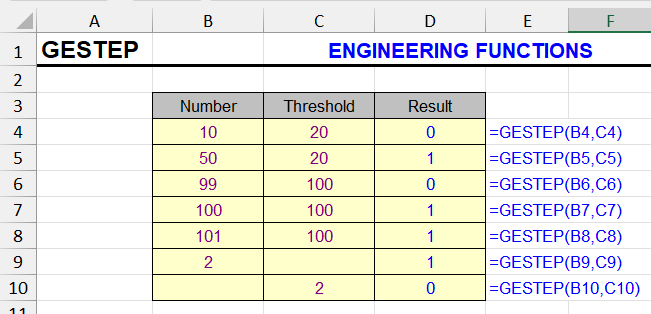
This function checks whether a number reaches a certain value (in other words, whether it's not less than the threshold).
If the number is greater than or equal to this value, the function returns 1, otherwise it returns 0.
GESTEP function syntax
=GESTEP(Number, Step)| A | B | C | |
|---|---|---|---|
| 1 | Number | Step | GESTEP |
| 2 | 5 | 3 | 1=GESTEP(A2,B2) |
| 3 | 3 | 3 | 1=GESTEP(A3,B3) |
| 4 | 2 | 3 | 0=GESTEP(A4,B4) |
| 5 | -1 | (omitted) | 0=GESTEP(A5) |
| 6 | 0 | (omitted) | 1=GESTEP(A6) |
Equal values give 1. Without Step, the threshold is 0. Text returns #VALUE!. The same check without GESTEP: =--(A2>=B2).
GESTEP formula example
The following table was used to calculate how many sales employees achieved their personal goals. The GESTEP function compares sales with targets, and the results are summed.
| A | B | C | D | |
|---|---|---|---|---|
| 1 | Employee | Sales | Target | Goal met |
| 2 | Anna | 12500 | 12000 | 1=GESTEP(B2,C2) |
| 3 | Bob | 9800 | 11000 | 0=GESTEP(B3,C3) |
| 4 | Cleo | 15000 | 15000 | 1=GESTEP(B4,C4) |
| 5 | Dan | 7000 | 8000 | 0=GESTEP(B5,C5) |
| 6 | Total | 2=SUM(D2:D5) |
GESTEP returns 1 for each employee whose sales reached the target (Cleo hit it exactly), and SUM counts them. One formula: =SUMPRODUCT(--(B2:B5>=C2:C5)).
Other engineering functions
BIN2DEC, DELTA, DEC2BIN, DEC2HEX, CONVERT, HEX2DEC
Like the article? Help its author! Buy !SEMTools, it has lots of useful instruments to process text data.