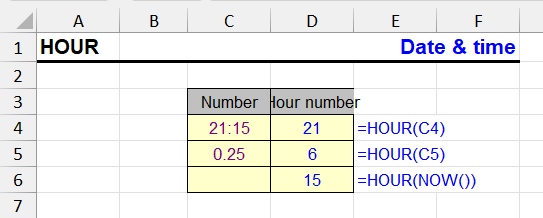
| Function Category | Date and Time |
| Volatility | Non-volatile |
| Related Functions | MINUTE — extracts the minute portion SECOND — extracts seconds TIME — assembles a time value from hours, minutes and seconds |
What Does the HOUR Function Do?
The HOUR function is used to extract the hour number from a time or date value. It returns an integer from 0 to 23, corresponding to the hour in 24-hour format.
HOUR function syntax
=HOUR(time)The time argument can be a reference to a cell with a date/time, the result of another function, or a string value recognized as time (e.g., "13:45").
HOUR formula examples
Extract the hour from time in cell A1:
=HOUR(A1)| A | B | C | |
|---|---|---|---|
| 1 | Value | HOUR | MINUTE |
| 2 | 18:30 | 18=HOUR(A2) | 30=MINUTE(A2) |
| 3 | 6:45 AM | 6=HOUR(A3) | 45=MINUTE(A3) |
| 4 | 10/22/2026 23:59 | 23=HOUR(A4) | 59=MINUTE(A4) |
| 5 | 10/22/2026 | 0=HOUR(A5) | 0=MINUTE(A5) |
| 6 | 0.75 (number) | 18=HOUR(A6) | 0=MINUTE(A6) |
| 7 | 1.5 (number) | 12=HOUR(A7) | 0=MINUTE(A7) |
HOUR looks only at the fractional part of the value: 0.75 of a day is 18:00, and 1.5 (a day and a half) is 12:00. A date without time gives 0. HOUR never returns more than 23 — for durations over a day, use =INT(A2*24).
If A1 contains 18:30, the formula returns 18.
Extract the hour from date and time:
=HOUR(NOW())| A | B | C | |
|---|---|---|---|
| 1 | Time | Hour | Shift |
| 2 | 07:15 | 7=HOUR(A2) | Morning=IF(AND(B2>=6,B2<14),"Morning",IF(AND(B2>=14,B2<22),"Day","Night")) |
| 3 | 13:40 | 13=HOUR(A3) | Morning=IF(AND(B3>=6,B3<14),"Morning",IF(AND(B3>=14,B3<22),"Day","Night")) |
| 4 | 22:05 | 22=HOUR(A4) | Night=IF(AND(B4>=6,B4<14),"Morning",IF(AND(B4>=14,B4<22),"Day","Night")) |
HOUR(NOW()) returns the current hour and updates on every recalculation. The same check against fixed time slots assigns events to shifts.
The formula returns the current hour at the time of calculation.
HOUR features and limitations
- The function works with both pure time and full dates.
- If the value doesn't contain time, the result will be 0.
- For proper operation, the cell must be recognized as time or date.
Functions related to HOUR
- MINUTE — extracts the minute portion
- SECOND — extracts seconds
- TIME — assembles a time value from hours, minutes and seconds
Other Date and Time Functions in Excel
TIMEVALUE, TIME, YEAR, DATE, DATEVALUE, EDATE, DAY, WEEKDAY, YEARFRAC, EOMONTH, MONTH, MINUTE, WEEKNUM, WORKDAY, DATEDIF, TODAY, SECOND, NOW, NETWORKDAYS
Like the article? Help its author! Buy !SEMTools, it has lots of useful instruments to process text data.